Voice Prompt Tool - Push-to-Talk Dictation for Windows with Groq Whisper
A lightweight Windows voice-to-text utility that records on a global hotkey, transcribes with Groq Whisper or a local faster-whisper fallback, and types the result straight into the active text field.
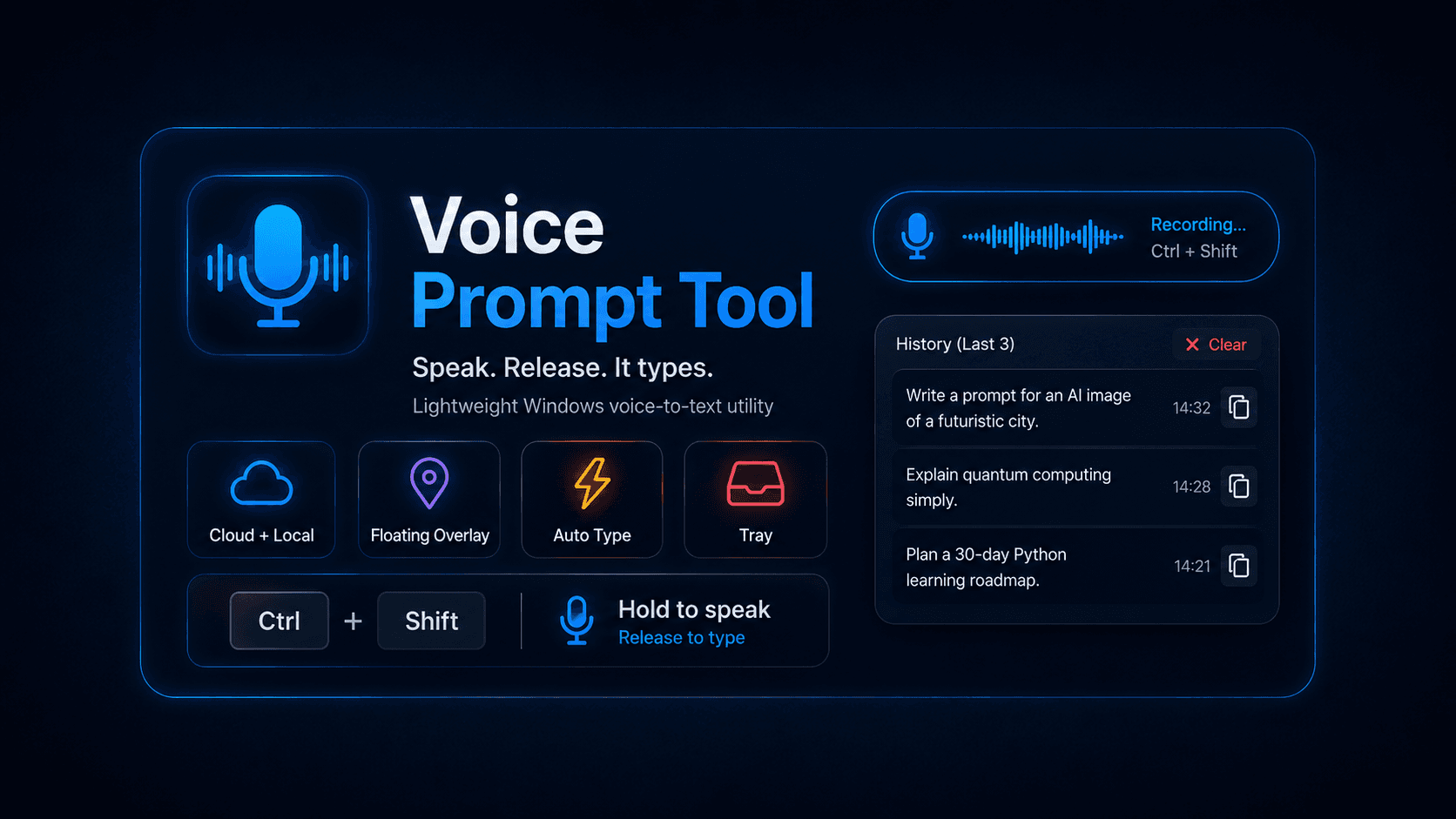
Voice Prompt Tool - Push-to-Talk Dictation for Windows with Groq Whisper
💻 View on GitHub: Voice Prompt Tool
📸 Project Preview
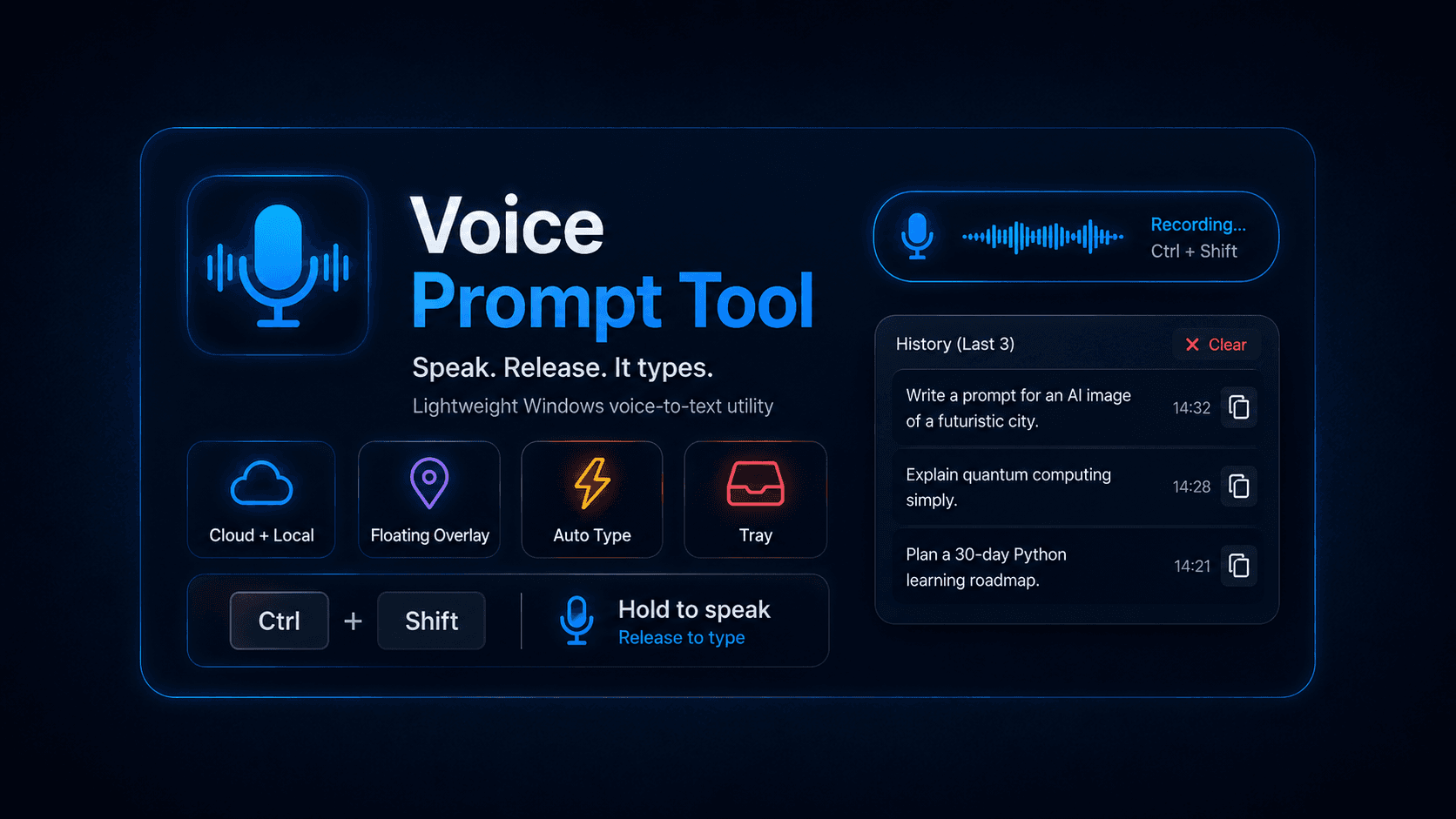

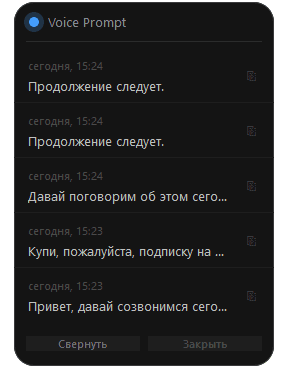
🚀 Quick Links
- 💻 GitHub Repository - View the full source code
📋 Table of Contents
- 🚀 Overview
- ✨ Key Features
- ⚡ How It Works
- 🛠️ Tech Stack
- 🏗️ Architecture
- 🎤 Audio Capture Pipeline
- 🧠 Transcription Strategy
- ⚙️ Configuration Model
- 🛡️ Reliability and Polish
- 🎯 Why This Project Stands Out
🚀 Overview
Voice Prompt Tool is a Windows desktop utility designed around a single, well-defined workflow: click into any text field, hold a global hotkey, speak, release, and watch the transcription appear at the cursor. It is built for writing prompts, notes, and messages hands-free — without context switches and without leaving the focused window.
Instead of being a generic dictation app, the project is shaped as a focused power-user tool:
- a floating pill overlay that always stays on top
- push-to-talk recording on
Ctrl + Shift - cloud transcription via Groq Whisper Large v3 Turbo
- on-device fallback through
faster-whisper - automatic keyboard injection into the active window
- clipboard sync for every transcription
- inline history of the last five transcriptions
- silent launch with no console window and a single-instance lock
The result is a small, predictable utility that behaves like a system-level feature rather than an application you have to open first.
✨ Key Features
🎙️ Push-to-Talk Capture
- Global
Ctrl + Shifthotkey works from any focused window - Live audio waveform rendered inside the overlay pill
- Recording is bounded by a configurable maximum duration
- Very short presses are ignored to avoid empty transcripts
⚡ Fast Cloud Transcription
- Groq API with
whisper-large-v3-turboas the primary backend - Typical round-trip of
0.2–0.5 sfor normal-length utterances - Explicit language hint (
ru/en) for faster, more accurate decoding - Resilient parsing of segments and detected language
🧱 Local Fallback
faster-whisperruns on-device when no API key is configured- Multiple model sizes (
tiny,base,small,medium) - Cached under
models/on first use - Same public interface as the cloud transcriber — fully swappable
🪟 Floating Overlay
- Always-on-top pill widget with no taskbar entry
- Color and opacity change with state (idle / recording / transcribing)
- Click to expand into a history panel with the last 5 transcriptions
- Per-entry copy buttons and a built-in close action
- Draggable, repositionable anywhere on screen
⌨️ Auto-Injection
- Transcription is typed at the cursor via
pynputkeyboard emulation - Same text is also written to the system clipboard
- Optional post-processing for capitalisation, punctuation, and custom replacements
🧰 Quality-of-Life Details
- System tray icon with status, history, settings, and quit
run.batlauncher with one-time virtual environment setup- Silent startup through
pythonw.exe(no console window) - Single-instance lock file prevents duplicate processes
- Rotating log files under
logs/for traceable diagnostics
⚡ How It Works
The workflow is intentionally minimal:
- Click into any text field — browser, IDE, chat, anywhere
- Hold
Ctrl + Shiftand speak - Release the keys
On release, the captured audio is sent to the transcription backend, the resulting text is typed into the focused window, and the same text is copied to the clipboard. The overlay reflects every stage:
- Idle — semi-transparent neutral pill
- Recording — animated waveform, green tint, raised opacity
- Transcribing — amber tint while the backend is working
- Idle — back to neutral, ready for the next press
The internal state machine is explicit:
textIDLE → RECORDING → TRANSCRIBING → IDLE
This single, linear pipeline is what makes the tool feel predictable: at any point the overlay shows exactly the same state the application is actually in.
🛠️ Tech Stack
Core Runtime
- Python 3.10+
- Windows 10 / 11
pythonw.exefor windowless launch
Audio and Transcription
sounddevicefor microphone capturewavefor WAV serialisation- Groq API (
whisper-large-v3-turbo) for cloud transcription faster-whisperfor local on-device transcription
System Integration
pynputfor the global hotkey and keyboard injectionTkinterfor the floating overlay widget- System tray icon with a contextual menu
.env+config.jsonfor runtime configuration
Tooling
run.batone-click launcher with auto-bootstrap- Single-instance lock file
- Rotating log files for diagnostics
🏗️ Architecture
The application is split into small, single-purpose modules inside app/, each owning one concern:
textVoice-Prompt-Tool/ ├── app/ │ ├── audio_recorder.py # Microphone capture, WAV writing, RMS callback │ ├── config.py # Strongly-typed configuration with validation │ ├── groq_transcriber.py # Groq Whisper cloud client │ ├── transcriber.py # Local faster-whisper backend │ ├── hotkeys.py # Global push-to-talk listener (pynput) │ ├── text_injector.py # Keyboard emulation into the focused window │ ├── text_postprocess.py # Capitalisation, punctuation, replacements │ ├── overlay.py # Floating pill widget + history panel │ ├── tray.py # System tray icon and context menu │ ├── state.py # IDLE → RECORDING → TRANSCRIBING state machine │ ├── history_service.py # Append-only JSON transcription history │ ├── single_instance.py # Lock file guard against duplicate processes │ ├── notifications.py # Tray balloon notifications │ ├── logger.py # Logging configuration │ └── main.py # Bootstrap and recording pipeline ├── data/history.json # Auto-created ├── logs/ # Auto-created ├── models/ # Local Whisper cache (auto-created) ├── temp/ # Temporary audio files (auto-created) ├── config.json # Auto-created on first run ├── requirements.txt ├── run.bat └── .env # GROQ_API_KEY (not committed)
Runtime Data Flow
At a high level, a single press of the hotkey moves data through the system like this:
textHotkey listener → State machine → Audio recorder → Transcriber (Groq | local) │ ▼ Post-processing → Text injector │ ▼ Clipboard + History + Overlay
This separation is what allows the transcriber to be swapped (cloud or local), the overlay to be disabled, and the post-processing to be customised — without touching the recording or injection layers.
🎤 Audio Capture Pipeline
The recorder is intentionally explicit and thread-safe. Each press of the hotkey starts a dedicated worker that writes to a unique WAV file under temp/, maintains an in-memory buffer for live previews, and emits normalised RMS levels to the overlay.
A few details that matter in practice:
- Bounded sessions — every recording has a
max_record_secondscap to prevent runaway captures - Minimum duration guard — presses shorter than
min_duration_secondsare silently discarded - Stale file cleanup — leftover temporary WAV files are removed on each new session
- Overflow detection —
sd.RawInputStreamoverflows are logged but do not crash the pipeline - Live RMS callback — the overlay subscribes to a normalised level (0.0–1.0) for the waveform
A simplified view of the capture loop:
pythonwith sd.RawInputStream( samplerate=self._config.sample_rate, channels=self._config.channels, dtype="int16", blocksize=self._config.block_frames, ) as stream: ready_event.set() while not stop_event.is_set(): remaining_frames = max_frames - session.frames_captured if remaining_frames <= 0: session.max_duration_reached = True break data, overflowed = stream.read( min(self._config.block_frames, remaining_frames) ) if overflowed: self._logger.warning("Audio input overflow detected while recording.") wav_handle.writeframes(data) with session.buffer_lock: session.audio_buffer.extend(data) session.frames_captured += len(data) // bytes_per_frame
The result of a session is a RecordingResult that either carries a RecordingArtifact (file path, duration, sample rate, frame count) or an explicit ignored reason. That makes the downstream pipeline trivial to reason about: there is always a structured outcome, never an implicit failure.
🧠 Transcription Strategy
The transcription layer is built around two interchangeable backends with the same public surface.
Cloud Backend — Groq Whisper
When GROQ_API_KEY is available, the cloud transcriber is preferred. It uses whisper-large-v3-turbo with response_format="verbose_json" so segments and a detected language are returned alongside the raw text.
pythonwith audio_path.open("rb") as f: response = self._client.audio.transcriptions.create( file=(audio_path.name, f.read()), model=self._model, language=self._language, response_format="verbose_json", prompt=self._initial_prompt or None, temperature=0.0, )
Key choices:
temperature=0.0for deterministic decoding- explicit
languagehint (ru/en) when configured, otherwise auto-detect - a configurable
initial_promptto bias the model toward domain vocabulary - a 30-second client-side timeout so the UI never hangs indefinitely
- a guard that flags suspicious transcripts (gibberish patterns) without silently dropping them
Local Backend — faster-whisper
When no API key is configured, the application falls back to faster-whisper running on the CPU. Model size, beam width, VAD filter, and compute type are all configurable, and the same TranscriptionResult shape is returned — so the rest of the pipeline does not need to know which backend produced the text.
Why Both Exist
This two-backend strategy is the difference between a demo and a tool you would actually keep installed:
- Groq gives fast, accurate dictation when online
- Local keeps the tool usable offline, on flights, or in restricted networks
- Same interface means the rest of the app — overlay, hotkey, injector — does not care which backend handled the request
⚙️ Configuration Model
The application is configured through config.json, generated with sensible defaults on first launch and validated on every load.
Why a Strongly-Typed Config Layer
Configuration parsing in this project is not a thin json.load. It is a deliberate layer that:
- merges user values on top of typed defaults
- validates every field with a precise error message (
ConfigError) - normalises hotkey tokens (
ctrl+shift,lctrl,space, …) into a canonical form - supports legacy keys for backward compatibility
- resolves paths relative to the project root, including in PyInstaller builds
The result is an AppConfig dataclass with nested, frozen sections — AudioConfig, TranscriptionConfig, OverlayUiConfig, GroqConfig, and so on — that the rest of the code can rely on without defensive checks.
A Minimal config.json
json{ "hotkey": { "combination": "ctrl+shift" }, "transcription": { "model_size": "small", "language_mode": "ru" }, "groq": { "enabled": true, "api_key": "", "model": "whisper-large-v3-turbo" }, "overlay": { "enabled": true, "margin": 12 } }
Notable knobs:
| Key | Accepted values | Description |
| ----------------------------- | ------------------------------------ | ------------------------------------------------------- |
| hotkey.combination | e.g. ctrl+shift, ctrl+alt+space | Push-to-talk key combination |
| transcription.language_mode | ru · en · auto | Explicit language is faster and more accurate than auto |
| transcription.model_size | tiny · base · small · medium | Local model size (ignored when Groq is enabled) |
| groq.enabled | true · false | true = Groq cloud, false = local faster-whisper |
| overlay.enabled | true · false | Show or hide the floating pill widget |
| overlay.margin | integer (px) | Distance from the screen edge |
The GROQ_API_KEY environment variable from .env takes precedence over an empty groq.api_key in config.json.
🛡️ Reliability and Polish
Small details add up to the feeling that this is a tool, not a script.
Silent, Single-Instance Launch
run.batbootstraps a.venv/on first run, installs dependencies, and starts the app silently viapythonw.exe- Subsequent launches skip setup and start immediately
- A lock file blocks duplicate processes so the global hotkey never has two listeners
Predictable State
- A single state machine (
IDLE → RECORDING → TRANSCRIBING → IDLE) drives the entire app - The overlay, tray icon, and notifications all read from the same state — so visual feedback never lies about what the app is doing
Defensive Boundaries
- The audio recorder enforces startup and stop timeouts (5 s each) and never blocks the UI forever
- Groq calls have an explicit 30 s timeout and fall back gracefully on failure
- Temporary WAV files are cleaned on a configurable schedule
- Logs are rotated under
logs/so diagnostics survive crashes
Built-in Diagnostics
When something goes wrong — a missing API key, a busy hotkey combination, a refused microphone — the failure is logged with enough context (path, model, language, timeout) to reproduce it. That makes the tool genuinely supportable rather than a black box.
🎯 Why This Project Stands Out
Voice Prompt Tool is small on purpose, but it combines several layers that are rarely shaped into one coherent desktop utility:
- a global push-to-talk hotkey that works from any focused window
- a thread-safe audio capture pipeline with bounded sessions and live RMS feedback
- two interchangeable transcription backends (Groq cloud + local Whisper) behind a single interface
- an always-on-top overlay that mirrors a real state machine
- automatic keyboard injection and clipboard sync into the active application
- a strongly-typed configuration layer with validation and legacy support
- a silent, single-instance Windows launcher with one-time auto-bootstrap
It is not just a wrapper around the Whisper API. It is a focused Windows tool where each layer — audio, transcription, injection, overlay, configuration — is deliberately designed to behave like a small piece of system-level infrastructure.