VKR SPA Library: A Framework-Agnostic JavaScript Solution for Building Single-Page Applications with an Integrated Admin Panel
A comprehensive Bachelor's thesis project on designing and implementing a modular JavaScript library for SPA development. Features include client-side routing, state management, UI components, and a built-in CMS panel, all built without external frameworks.
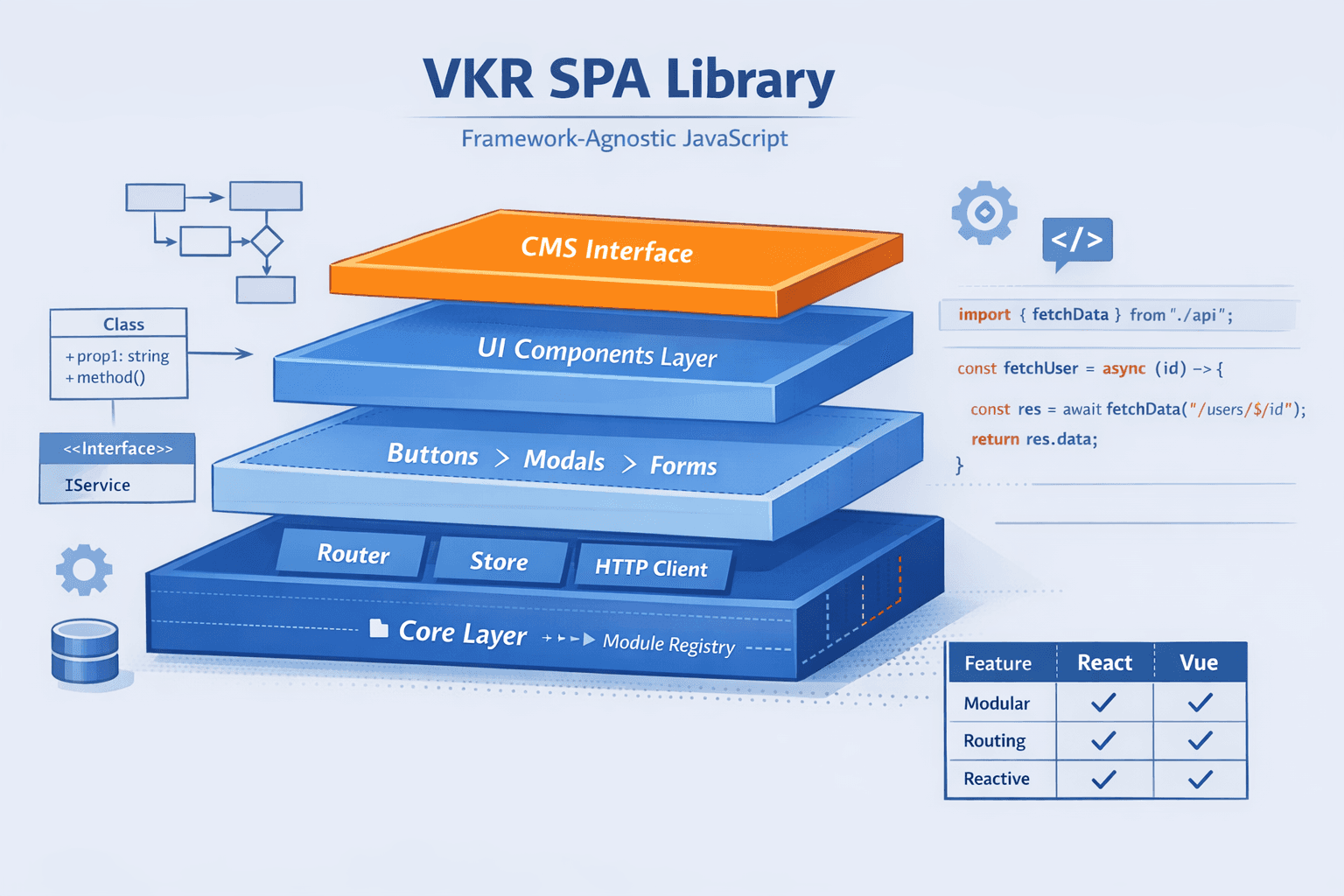
VKR SPA Library: A Framework-Agnostic JavaScript Solution
🏫 Academic Project: This work was completed as a Bachelor's Graduation Thesis (VKR) at Samara National Research University. 📖 Full Thesis: View Complete Documentation & Source Code
📋 Abstract
This thesis presents the design, implementation, and evaluation of VKR SPA Library, a modular JavaScript library for constructing Single-Page Applications (SPAs) without dependencies on mainstream frameworks like React or Angular. The library addresses the need for lightweight, easily integrable solutions that lower the entry barrier for SPA development while providing essential modern features.
The core contribution is a four-layer architecture implementing client-side routing, centralized and persistent state management, a suite of reusable UI components, and a unique client-side administrative panel for content management. The system leverages pure ES6+ JavaScript, established design patterns, and modern Web APIs. A custom build pipeline using Gulp ensures compatibility and optimization. The project includes full UML design documentation, performance testing, and a comparative analysis with existing solutions (React, Vue.js, jQuery UI), validating its practical utility for prototyping and medium-scale web projects.
Keywords: Single-Page Application, JavaScript Library, Client-Side Architecture, State Management, UI Components, Content Management System, Modular Design, UML
📸 Project Preview
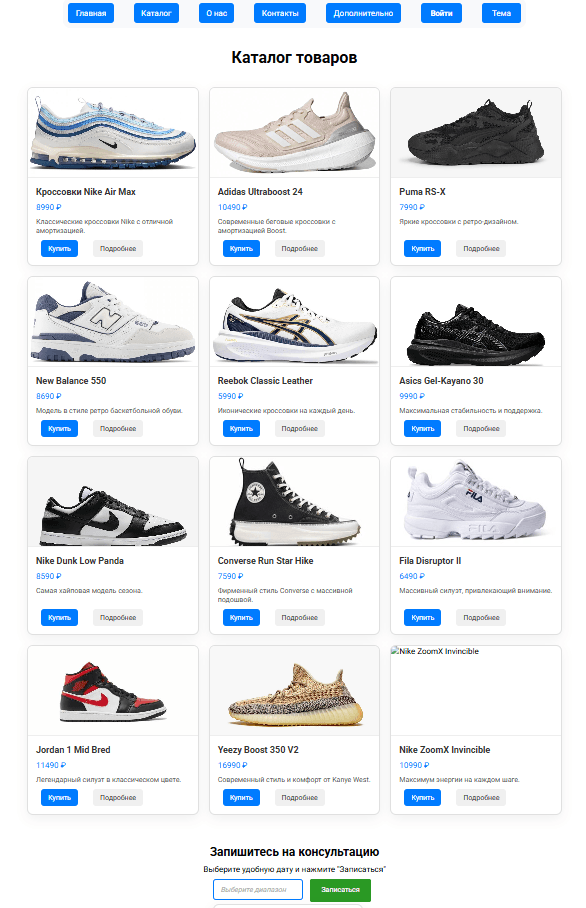
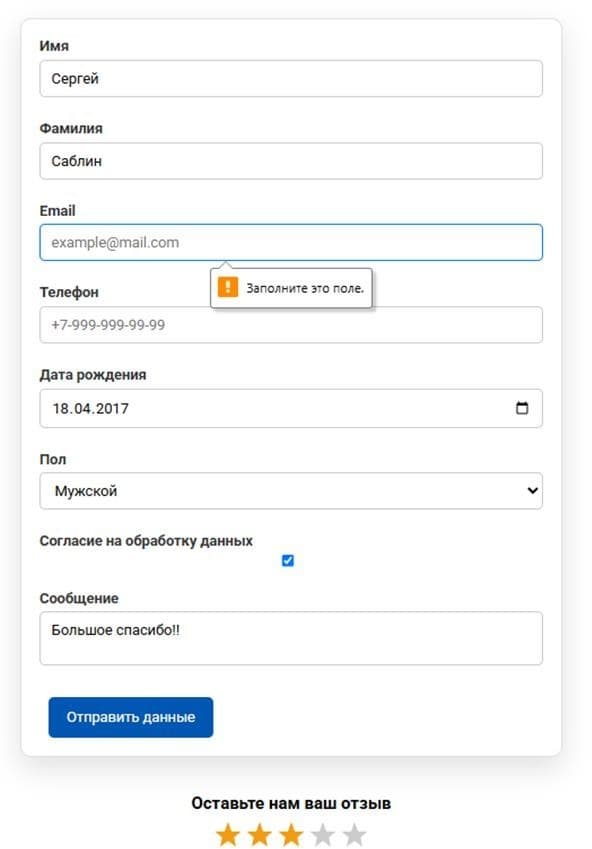
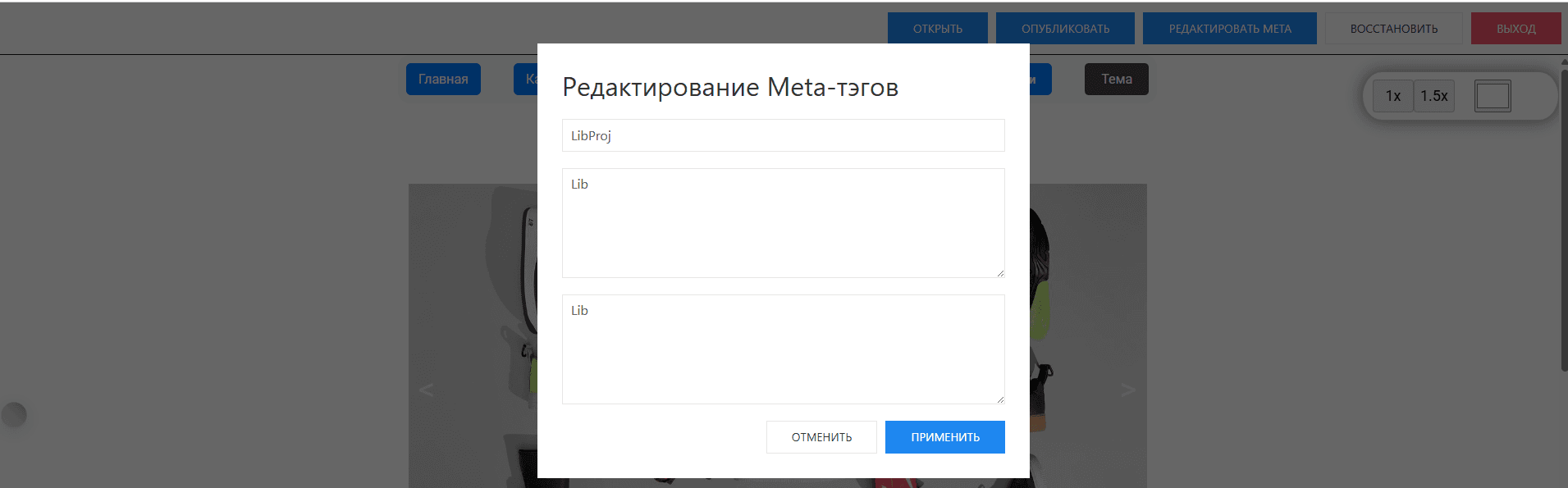
1. Introduction & Problem Analysis
Modern web development demands highly interactive and responsive user interfaces. While traditional multi-page applications (MPAs) cause full page reloads, degrading user experience, Single-Page Applications (SPAs) load a single HTML page and dynamically update content. Popular frameworks like React and Vue.js solve this but introduce complexity: heavy build configurations, deep ecosystem knowledge, and large bundle sizes.
This project identifies a niche for a lightweight, framework-agnostic library that:
- Connects via a single
<script>tag without a build step. - Provides core SPA mechanisms (routing, state management).
- Includes a ready-made set of styled UI components.
- Integrates a client-side administrative panel for real-time content editing, a feature absent in most comparable libraries.
The goal was to create a tool that simplifies SPA development for educational purposes, rapid prototyping, and projects where framework overhead is undesirable.
2. Domain Analysis & Comparative Study
2.1 Core Concepts
The library is built upon well-defined SPA concepts:
- Component: A self-contained UI block with its own logic, template, and styles (e.g., Carousel, Modal).
- Module: A logically complete set of functions (e.g., Router, Store, HTTP Client) registered in a central core.
- Client-Side Routing: A mechanism that maps URL changes (hash/History API) to specific components without page reloads.
- Centralized State (Store): A global data container synchronized across components using the Observer pattern.
- Persistent Storage (Storage): Client-side data caching using the Web Storage API (localStorage).
- Administrative Panel: An interface embedded via an
<iframe>allowing CRUD operations on page content, metadata, and backups without server access.
2.2 Analysis of Existing Solutions
A comparative review was conducted against three primary analogues:
text| Feature | **React** | **Vue.js** | **jQuery UI** | **VKR SPA Library** | | :-------------------------- | :------------: | :------------: | :-----------: | :-----------------: | | **SPA Routing** | ✅ (with libs) | ✅ (with libs) | ❌ | ✅ | | **State Management** | ✅ (with libs) | ✅ (with libs) | ❌ | ✅ | | **Pre-built UI Components** | ❌ | ❌ | ✅ | ✅ | | **No Build Step Required** | ❌ | ❌ | ✅ | ✅ | | **SCSS & Theming** | ✅ | ✅ | ❌ | ✅ | | **Integrated Admin Panel** | ❌ | ❌ | ❌ | ✅ | | **Framework Agnostic** | ❌ | ❌ | ✅ | ✅ |
Conclusion: While React/Vue are powerful, they require complex setup. jQuery UI offers components but lacks SPA features. Our library fills the gap by combining SPA architecture, UI components, and a unique admin panel in a zero-build package.
3. System Design & Architecture
3.1 Conceptual Model & Layered Architecture
The library is structured into four distinct logical layers to ensure separation of concerns, modularity, and ease of extension.
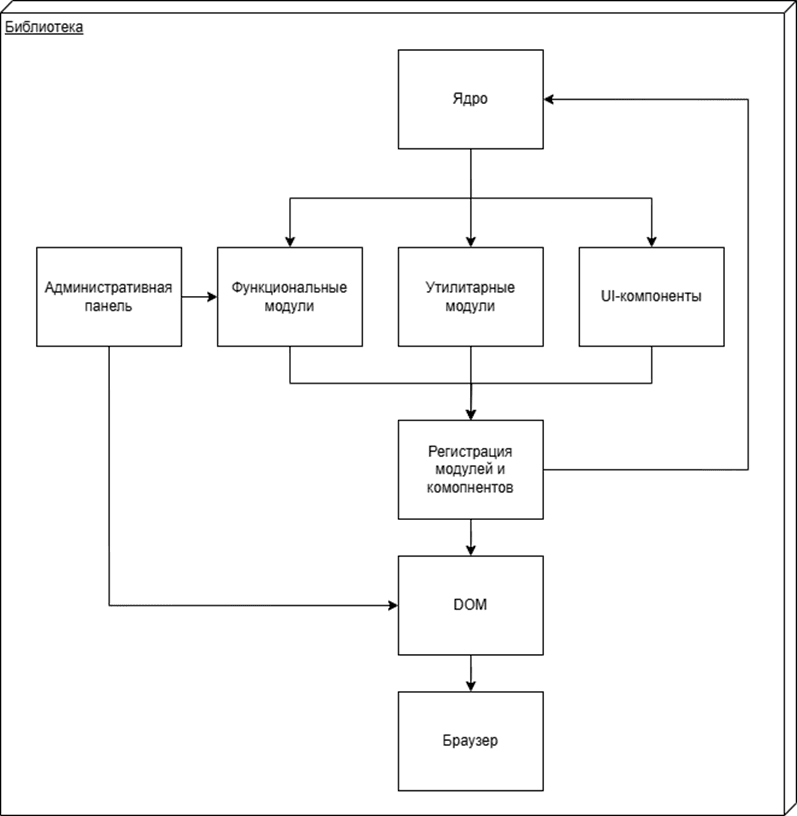
- Core Layer: Responsible for initializing the library and managing a global module Registry. All functional modules register here upon load.
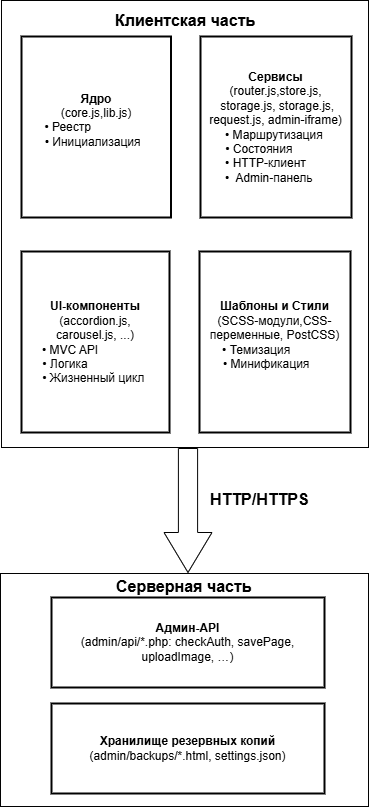
- Service Layer: Contains the main business logic modules: Router for navigation, Store for global state, Storage for persistence, HTTP Client for server communication, and the Admin Panel module.
- UI Components Layer: A collection of reusable, self-contained interface widgets (buttons, forms, carousels, modals) with a unified lifecycle API.
- Templates & Styles Layer: Manages presentation via SCSS modules, CSS custom properties for dynamic theming, and processed through PostCSS for optimization.
3.2 Structural Design
The high-level interaction between the client-side library and the server-side backend for the admin panel is defined in the structural scheme.
3.3 Dynamic Behavior: Page Load Activity
The sequence of operations during user navigation is critical for SPA responsiveness.
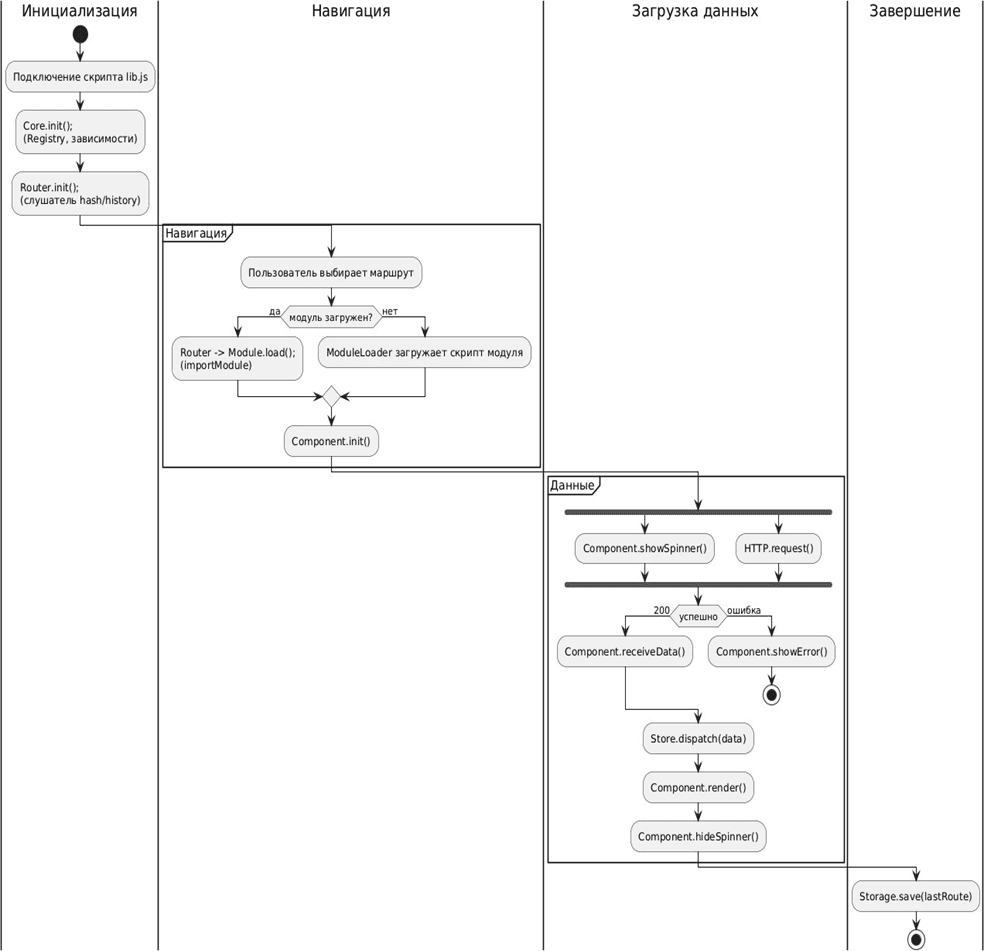
The flow is as follows:
- Initialization: The core library script loads, registers modules, and starts the router.
- Navigation: User action triggers a route change.
- Module Resolution & Loading: The router checks if the target module is loaded, fetching it dynamically (
import()) if necessary. - Data Fetching & State Update: The component initializes, displays a loading spinner, fetches data via the HTTP client, and updates the central store.
- Rendering & Cleanup: The component renders with the new data, the spinner is hidden, and the current route is saved to
localStorage.
4. Implementation Details
4.1 Technology Stack Justification
- Language: Vanilla JavaScript (ES6+) for modern syntax (modules, classes, promises) without transpilation dependency for development.
- Styling: SCSS for modular, themable styles and PostCSS for auto-prefixing and minification.
- Build Automation: Node.js and Gulp create a pipeline for transpiling (Babel), compiling SCSS, bundling, and minifying production files (
lib.js,styles.css). - Backend (Admin Panel): PHP with a REST API (
checkAuth.php,savePage.php) provides simple CRUD endpoints, testable with MAMP. - Tooling: VS Code for development, Chrome DevTools for debugging and performance profiling.
4.2 Component Architecture
The library is implemented as a set of cohesive, loosely coupled modules.
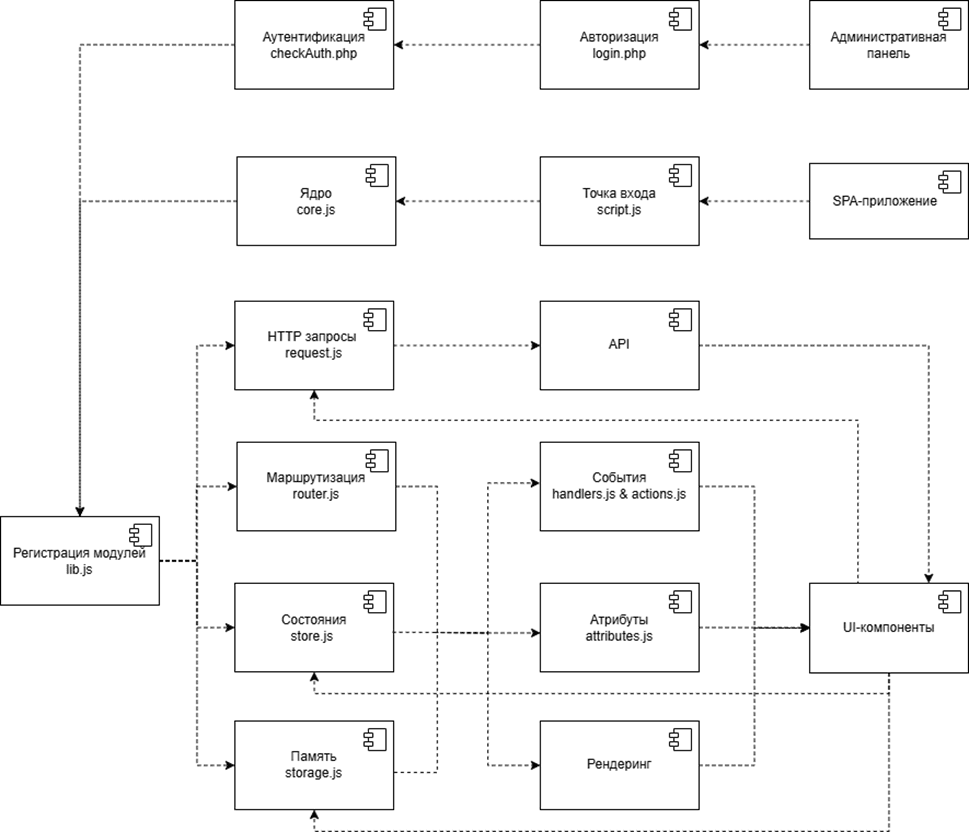
Key implemented modules include:
Core&Registry: The bootstrap and module dependency manager.Router: Handles hash-based navigation, route matching, and lazy loading.Store: A simple Observable implementation for global state.Storage: A wrapper aroundlocalStoragewith serialization and TTL management.HTTP Client: A Fetch API wrapper with centralized error handling and auth token management.Admin Panel: A self-contained SPA loaded in an iframe, communicating with the PHP API.UI Components: Implemented widgets following a consistent lifecycle (init(),render(),destroy()).
4.3 Deployment Architecture
The library operates within a defined deployment environment, from development to production delivery.
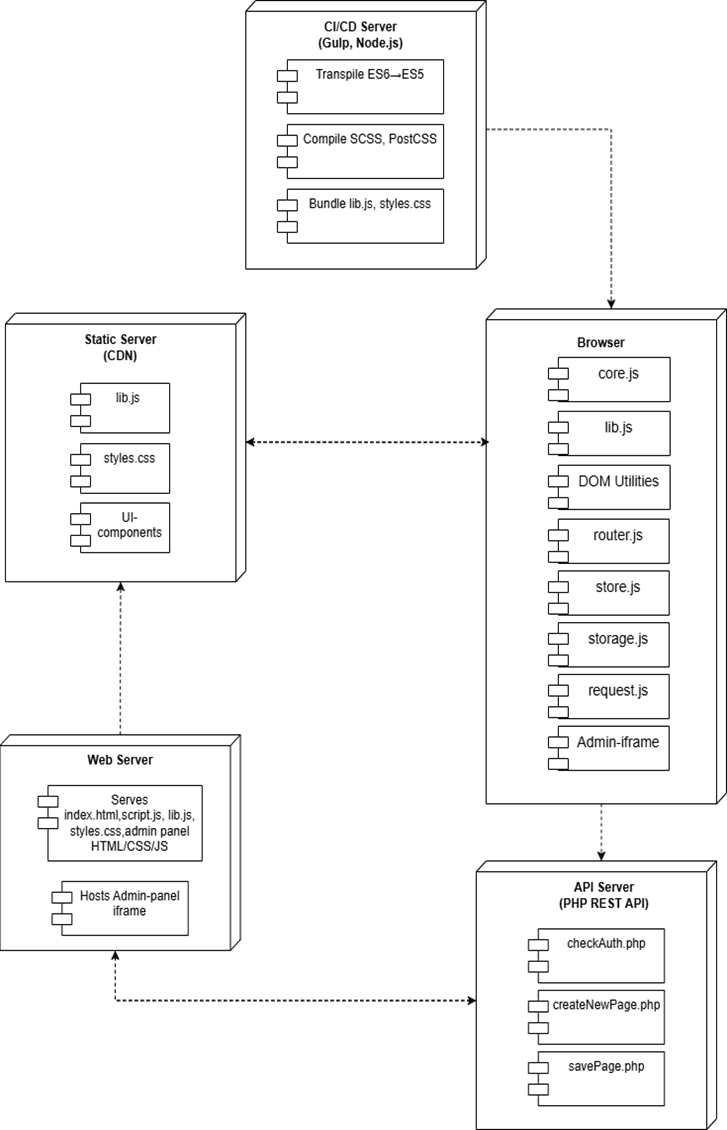
- CI/CD Server (Gulp): The development hub. It transpiles ES6+ to ES5, compiles SCSS, bundles, and minifies assets.
- Static Server (CDN): Hosts the final library bundles (
lib.js,styles.css) for high-availability delivery. - Browser: The primary execution environment. Loads the core library, dynamically imports modules, and hosts the admin panel within an iframe.
- Web Server: Serves the main
index.htmland hosts the admin panel's iframe content. - API Server (PHP): Provides the RESTful backend for all admin panel operations (authentication, page CRUD, backup management).
4.4 Key Technical Implementations
- Registry Pattern: All modules self-register with the core, enabling loose coupling and dynamic discovery.
- Observer Pattern for State: The
Storenotifies all subscribed components of state changes, ensuring UI consistency. - Lazy Loading: Route components are loaded on-demand using dynamic
import(), optimizing initial page load time. - Admin Panel Security: The panel runs in a sandboxed
<iframe>, isolating it from the main application DOM for security and stability.
5. Testing & Performance Evaluation
A rigorous testing strategy was employed to validate functionality and efficiency:
- Unit Testing (Jest): Core modules (Router, Store, HTTP Client) were tested with >20 test cases each, focusing on initialization, serialization, and error handling. Execution time: ~120ms.
- Integration Testing (Puppeteer): Simulated real user scenarios: navigation, form submission, admin CRUD operations. Metrics like Time to Interactive (TTI) were recorded (e.g., catalog page load: ~480ms).
- Performance Analysis (Lighthouse): Benchmarked the demo application:
- First Contentful Paint (FCP):
620 ± 30 ms - Time to Interactive (TTI):
1200 ± 80 ms - Total JS Execution Time:
50 ± 5 ms
- First Contentful Paint (FCP):
- Memory Profiling (DevTools): Memory growth was limited to <15 MB during intensive navigation, with proper cleanup after component destruction.
- Load Testing (Apache Bench): The Admin API handled ~200 requests per second with an average response time of
80-120 ms.
Results: The library demonstrated functional completeness, efficient resource consumption, and stable performance under load, confirming its readiness for practical use.
6. Conclusion
The VKR SPA Library project successfully achieved its objective: to design and implement a functional, standalone JavaScript library for building Single-Page Applications. The work makes several concrete contributions:
- Architectural Design: A well-defined, four-layer modular architecture that cleanly separates concerns and facilitates extension.
- Feature Implementation: Practical implementation of essential SPA mechanisms (routing, state management) using vanilla JS and design patterns, without external framework dependencies.
- Innovative Admin Panel: Integration of a client-side content management system directly into the library, a feature not found in mainstream alternatives.
- Production-Ready Tooling: A configured build and deployment pipeline ensuring code quality, compatibility, and performance.
- Comprehensive Validation: The library was substantiated through comparative analysis, UML modeling, and a multi-faceted testing regime.
The library is particularly suited for educational contexts (to understand SPA internals), rapid prototyping, and lightweight projects where the complexity of large frameworks is unjustified. It serves as a testament to the capabilities of modern vanilla JavaScript and provides a foundation that could be extended with features like Virtual DOM diffing or Server-Side Rendering in future work.
🚀 Project Resources & References
- GitHub Repository & Full Thesis Code: https://github.com/Figrac0/VKR_LIB
- Core Technologies: ES6+, HTML5 Web APIs, SCSS, PHP
- Design Patterns: Registry, Observer, Module
- Build Tools: Node.js, Gulp, Babel, PostCSS
- Testing Frameworks: Jest, Puppeteer, Lighthouse
- UML Diagrams: Created with standard UML 2.0 notation.
Academic Context: This work was submitted as a Bachelor's Graduation Thesis to the Department of Software Systems at Samara National Research University (Samara University).