Understanding Node.js Event Loop: The Heart of Asynchronous Programming
Deep dive into Node.js Event Loop architecture. Learn how Node.js handles thousands of concurrent connections with a single thread. Explore practical patterns for building scalable, high-performance applications with real-world examples.

Understanding Node.js Event Loop: The Heart of Asynchronous Programming
Node.js has revolutionized server-side programming with its unique single-threaded, event-driven architecture. At the core of this architecture lies the Event Loop - a concept that both fascinates and confuses developers. Let's demystify how Node.js handles thousands of concurrent connections with just one thread.
The Great Misconception
First, let's address a common misconception: Node.js is not single-threaded.
While your JavaScript code runs in a single thread, Node.js uses multiple threads under the hood for I/O operations through libuv, its asynchronous I/O library. This hybrid approach is what makes Node.js both efficient and scalable.
The Node.js Architecture Stack
Before diving into the event loop, let's understand Node.js architecture:
-------------------------------
 ┌─────────────────────────────┐
 │ Your JavaScript             │
 │ Application                 │
 ├─────────────────────────────┤
 │ Node.js                     │
 │ Core Modules                │
 ├─────────────────────────────┤
 │ V8 Engine                   │
 │ (JavaScript Execution)      │
 ├─────────────────────────────┤
 │ libuv                       │
 │ (Event Loop + Thread Pool)  │
 └─────────────────────────────┘
 │ Operating System            │
 │ (File System, Network)      │
 └─────────────────────────────┘
 -------------------------------
Visualizing the Event Loop Architecture
Here's how Node.js processes requests through its event loop:
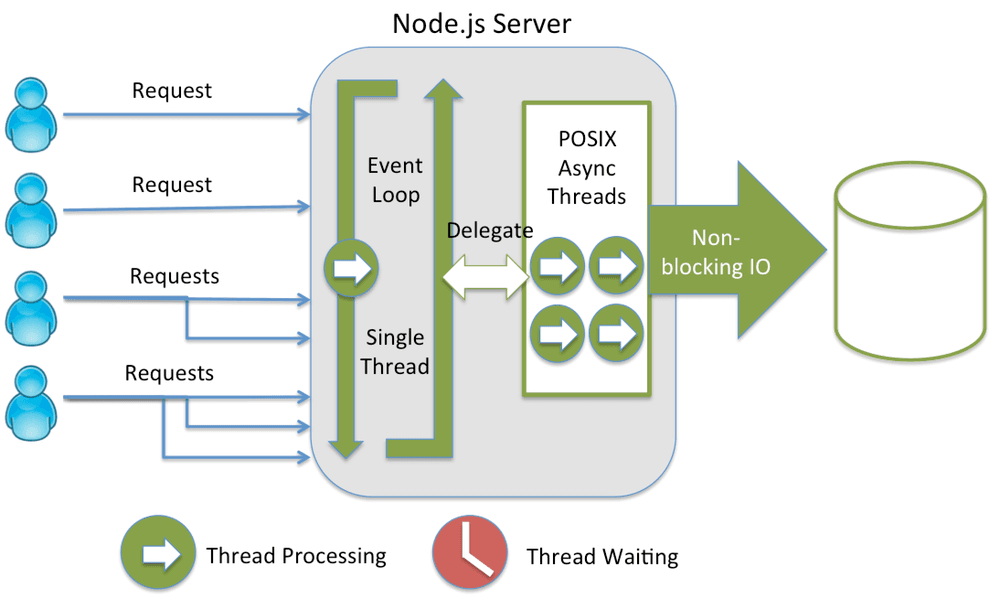
Diagram: Node.js single-threaded event loop with thread pool delegation
The Event Loop Phases
The event loop operates in distinct phases. Each phase has a FIFO (First In, First Out) queue of callbacks to execute:
1. Timers Phase
Executes callbacks scheduled by setTimeout() and setInterval()
javascript// Example timer callback setTimeout(() => { console.log("Timer executed"); }, 1000);
2. Pending Callbacks Phase
Executes I/O callbacks deferred from the previous loop iteration
3. Idle, Prepare Phase
Internal operations (used by Node.js internally)
4. Poll Phase
- Retrieves new I/O events
- Executes I/O-related callbacks
- Will block here if no timers are scheduled
5. Check Phase
Executes setImmediate() callbacks
javascriptsetImmediate(() => { console.log("setImmediate executed"); });
6. Close Callbacks Phase
Executes close event callbacks (e.g., socket.on('close', ...))
How It Actually Works: A Practical Example
Let's trace through what happens when you run this code:
javascriptconst fs = require("fs"); console.log("Program started"); // 1. Synchronous operation const config = { port: 3000 }; console.log("Config loaded:", config); // 2. Asynchronous file read fs.readFile("/path/to/file.txt", "utf8", (err, data) => { console.log("File content:", data); }); // 3. Timer setTimeout(() => { console.log("Timeout completed"); }, 0); // 4. setImmediate setImmediate(() => { console.log("Immediate callback"); }); console.log("Program ended");
Execution Order:
Program started(synchronous)Config loaded(synchronous)Program ended(synchronous)Immediate callback(check phase)Timeout completed(timer phase - even with 0ms delay)File content(poll phase when file reading completes)
The Thread Pool: Node.js' Secret Weapon
While JavaScript runs single-threaded, Node.js uses a thread pool (default: 4 threads) for certain operations:
Operations that use the thread pool:
- File system operations (fs module)
- DNS lookups (dns.lookup())
- Crypto operations (crypto.pbkdf2, crypto.randomBytes, etc.)
- Zlib compression (zlib module)
Operations that DON'T use the thread pool:
- Network I/O (HTTP, TCP, UDP)
- Named pipes
- Some DNS operations (dns.resolveX)
javascript// This uses the thread pool const crypto = require("crypto"); crypto.pbkdf2("password", "salt", 100000, 64, "sha512", (err, derivedKey) => { console.log("Password hashed in thread pool"); }); // This doesn't use the thread pool const http = require("http"); http.get("http://example.com", (res) => { console.log("HTTP request completed via OS async mechanism"); });
Understanding Blocking vs Non-Blocking
Blocking Operations
javascript// SYNCHRONOUS (Blocking) - AVOID IN PRODUCTION const data = fs.readFileSync("/path/to/file.txt"); console.log(data); // Everything waits here console.log("This executes after file is read");
Non-Blocking Operations
javascript// ASYNCHRONOUS (Non-blocking) - RECOMMENDED fs.readFile("/path/to/file.txt", "utf8", (err, data) => { console.log(data); }); console.log("This executes immediately while file is being read");
The Magic of Event-Driven Architecture
Node.js excels at handling many concurrent connections because of its event-driven nature:
javascriptconst http = require("http"); const server = http.createServer((req, res) => { // Each request is handled asynchronously if (req.url === "/slow") { // Simulate slow operation setTimeout(() => { res.end("Slow response"); }, 3000); } else { res.end("Fast response"); } }); server.listen(3000, () => { console.log("Server handling thousands of connections..."); });
Why this works:
- Request comes in → callback registered
- Event loop continues → can handle other requests
- Timer completes → callback executed
- Response sent → connection closed
Common Event Loop Pitfalls and Solutions
Pitfall 1: Blocking the Event Loop
javascript// BAD: Blocks event loop function calculatePrimes(limit) { const primes = []; for (let i = 2; i <= limit; i++) { let isPrime = true; for (let j = 2; j < i; j++) { if (i % j === 0) { isPrime = false; break; } } if (isPrime) primes.push(i); } return primes; } // GOOD: Use worker threads or break into chunks const { Worker } = require("worker_threads"); function calculatePrimesAsync(limit) { return new Promise((resolve, reject) => { const worker = new Worker("./prime-worker.js", { workerData: { limit }, }); worker.on("message", resolve); worker.on("error", reject); }); }
Pitfall 2: Microtask Queue Starvation
javascript// BAD: Can starve I/O operations function recursiveMicrotask() { Promise.resolve().then(() => { console.log("Microtask executed"); recursiveMicrotask(); // Infinite microtask queue! }); } // GOOD: Yield to event loop async function yieldToEventLoop() { for (let i = 0; i < 1000; i++) { await Promise.resolve(); // Allows event loop to process I/O // Process batch } }
Performance Optimization Techniques
1. Cluster Mode for CPU-Intensive Tasks
javascriptconst cluster = require("cluster"); const os = require("os"); if (cluster.isMaster) { const cpuCount = os.cpus().length; for (let i = 0; i < cpuCount; i++) { cluster.fork(); } cluster.on("exit", (worker) => { console.log(`Worker ${worker.process.pid} died`); cluster.fork(); }); } else { // Worker process require("./app.js"); }
2. Worker Threads for Heavy Computation
javascript// main.js const { Worker } = require("worker_threads"); function runService(workerData) { return new Promise((resolve, reject) => { const worker = new Worker("./worker.js", { workerData }); worker.on("message", resolve); worker.on("error", reject); worker.on("exit", (code) => { if (code !== 0) { reject(new Error(`Worker stopped with exit code ${code}`)); } }); }); } // worker.js const { parentPort, workerData } = require("worker_threads"); // Perform CPU-intensive task const result = heavyComputation(workerData); parentPort.postMessage(result);
3. Proper Connection Pooling
javascriptconst { Pool } = require("pg"); // Create a single pool for your application const pool = new Pool({ max: 20, // Maximum number of clients in the pool idleTimeoutMillis: 30000, connectionTimeoutMillis: 2000, }); // Reuse connections instead of creating new ones async function queryDatabase(sql, params) { const client = await pool.connect(); try { const result = await client.query(sql, params); return result.rows; } finally { client.release(); // Return connection to pool } }
Real-World Case Study: High-Traffic API
Let's examine how a high-traffic API leverages the event loop:
javascriptconst express = require("express"); const app = express(); // Middleware optimization app.use(express.json({ limit: "10kb" })); // Limit payload size // Route handlers designed for async flow app.get("/api/users/:id", async (req, res) => { try { // 1. Quick validation (sync - cheap) const userId = parseInt(req.params.id); if (!userId) { return res.status(400).json({ error: "Invalid user ID" }); } // 2. Cache check (async - non-blocking) const cachedUser = await cache.get(`user:${userId}`); if (cachedUser) { return res.json(cachedUser); } // 3. Database query (async - delegated to thread pool if needed) const user = await db.users.findById(userId); if (!user) { return res.status(404).json({ error: "User not found" }); } // 4. Cache result for future requests (async) await cache.set(`user:${userId}`, user, 3600); // 5. Send response res.json(user); } catch (error) { console.error("Error:", error); res.status(500).json({ error: "Internal server error" }); } }); // Health check endpoint (fast, no blocking operations) app.get("/health", (req, res) => { res.json({ status: "healthy", timestamp: Date.now() }); }); app.listen(3000, () => { console.log("API server running on port 3000"); });
Why this works well:
- Fast synchronous operations for validation
- Non-blocking I/O for database and cache
- Error handling doesn't block event loop
- Health check remains responsive
Debugging Event Loop Issues
Monitoring Event Loop Lag
javascriptlet lastTime = Date.now(); function monitorEventLoop() { const now = Date.now(); const lag = now - lastTime - 1000; // Expected 1000ms interval lastTime = now; if (lag > 100) { // Threshold: 100ms console.warn(`Event loop lag detected: ${lag}ms`); // Log stack trace or take action } } setInterval(monitorEventLoop, 1000);
Using Performance Hooks
javascriptconst { performance, PerformanceObserver } = require("perf_hooks"); const obs = new PerformanceObserver((items) => { items.getEntries().forEach((entry) => { console.log(`${entry.name}: ${entry.duration}ms`); }); }); obs.observe({ entryTypes: ["measure"] }); performance.mark("A"); // Your code here performance.mark("B"); performance.measure("A to B", "A", "B");
Best Practices Summary
- Keep synchronous operations fast - They block the event loop
- Use async APIs whenever possible - Leverage non-blocking I/O
- Break heavy computations - Use worker threads or microtasks
- Monitor event loop lag - Detect performance issues early
- Understand your workload - CPU-bound vs I/O-bound operations
- Use connection pooling - Avoid creating new connections per request
- Implement circuit breakers - Prevent cascading failures
- Profile your application - Identify bottlenecks
Recommended Resources
- Node.js Event Loop Documentation - Official Node.js guide
- libuv Documentation - Understand the underlying library
- Philip Roberts: What the heck is the event loop anyway? - Classic JSConf talk
- Bryan Hughes: Node.js Event Loop - Deep dive presentation
- Node.js Design Patterns Book - Patterns for scalable applications
Practice Exercises
- Monitor event loop delay in a simple server
- Create a blocking endpoint and observe its impact
- Implement a worker thread for image processing
- Build a connection pool for database queries
- Profile a Node.js application using built-in tools
Conclusion
The Node.js event loop is a masterpiece of engineering that enables JavaScript to handle high-concurrency scenarios efficiently. By understanding its phases, recognizing blocking patterns, and leveraging its asynchronous nature properly, you can build scalable, performant applications.
Remember: Node.js isn't single-threaded for everything - it's single-threaded for your JavaScript code, but uses multiple threads intelligently for I/O operations. This hybrid model is why Node.js can handle more concurrent connections than traditional threaded models while keeping memory usage low.
The key to mastering Node.js is understanding that everything is asynchronous unless it's not. Embrace the event-driven paradigm, write non-blocking code, and let Node.js do what it does best: handling many things at once, efficiently.
Challenge yourself: Build a simple HTTP server that can handle 10,000 concurrent connections using what you've learned about the event loop. Measure its performance and optimize based on the principles discussed in this tutorial.