T-Guide - Smart Audio Guide and Urban Route Builder
A full-stack web and Android application for self-guided city tours with audio guides, real-time GPS navigation, a drag-to-snap map sheet, route builder, curated tours, and a full admin panel — built on React 19, Leaflet, and Capacitor 8.
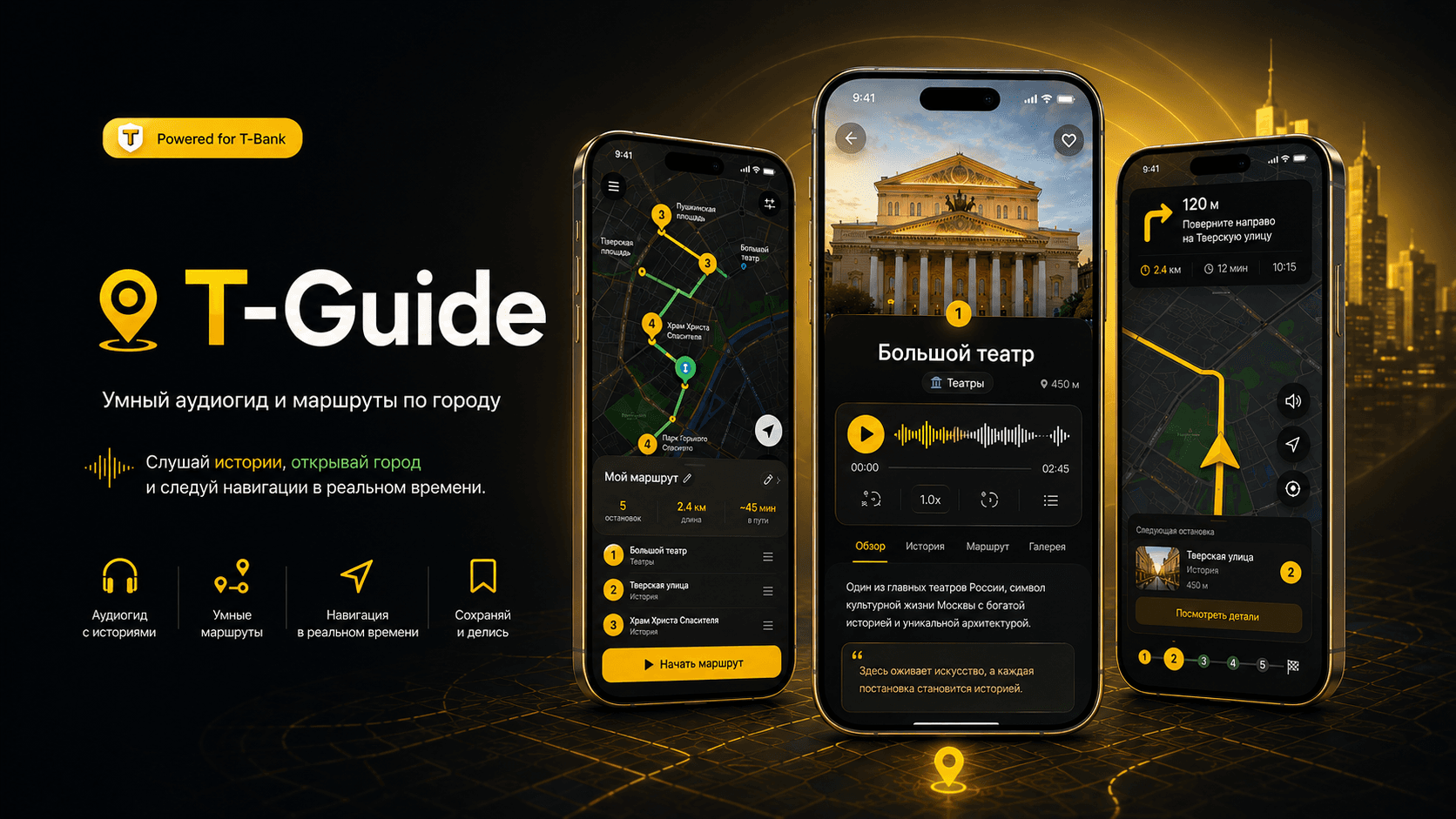
T-Guide - Smart Audio Guide and Urban Route Builder
📸 Project Preview
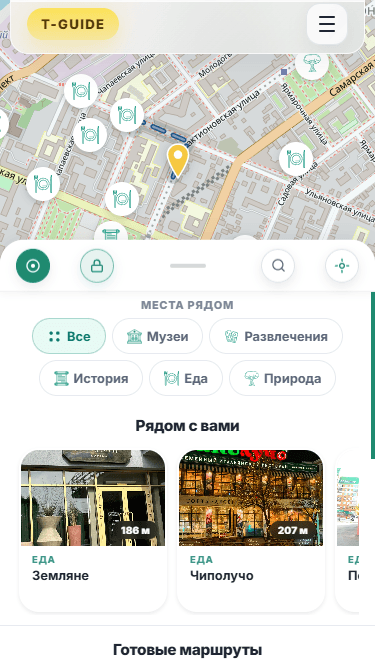
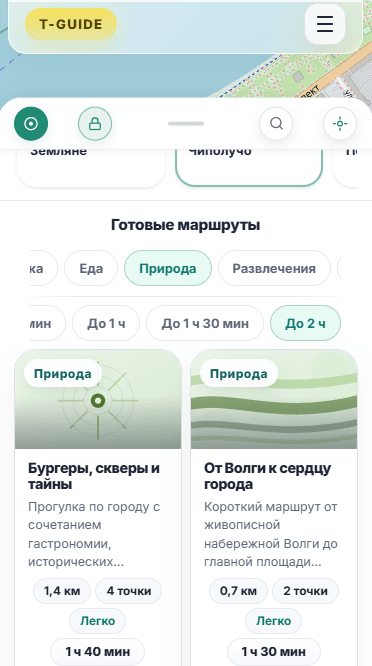
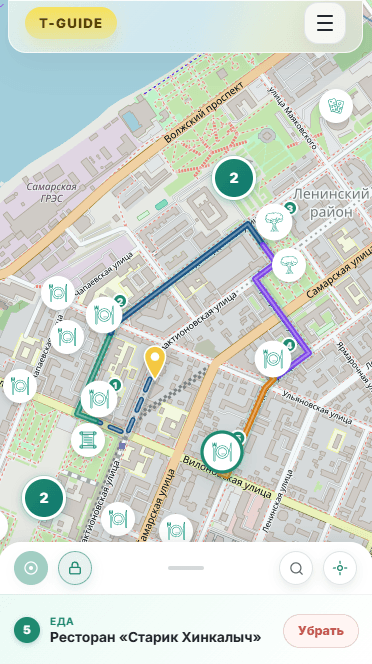
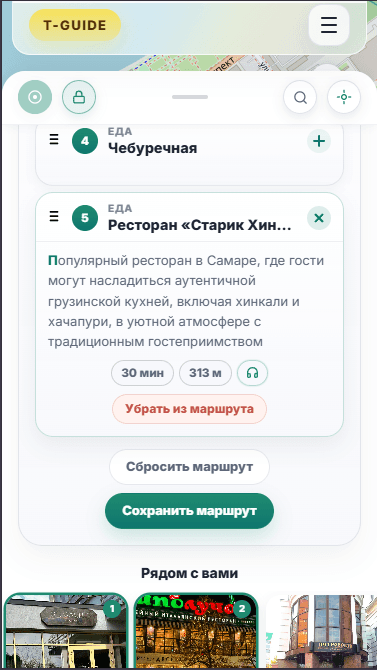
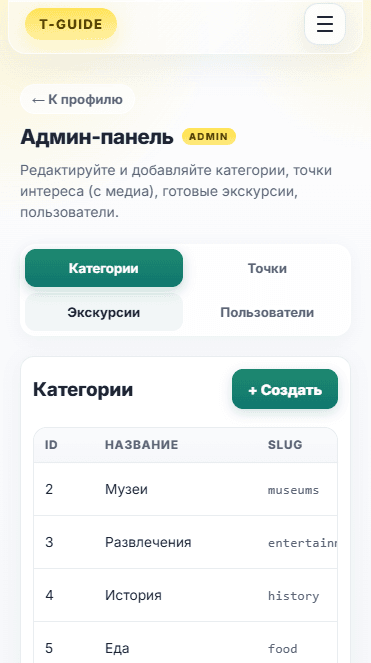
🚀 Quick Links
- 🌐 Live Demo - Open the deployed application
- 💻 GitHub Repository - View the full source code
📋 Table of Contents
- 🚀 Overview
- ✨ Key Features
- 🗺️ Discovery Map and Bottom Sheet
- 🎧 Audio Guide Layer
- 🧭 Route Builder and OSRM Navigation
- 📋 Curated Routes and Profile
- 🔐 Authentication and Admin Panel
- 📱 Android via Capacitor 8
- 🏗️ Feature-Sliced Architecture
- 🚀 Deployment, Docker, and CI/CD
- 🎯 Why This Project Stands Out
🚀 Overview
T-Guide is a smart audio guide and urban route builder. The user opens the app on a full-screen map, sees nearby points of interest, listens to professional audio stories about each place, can assemble a personal route stop by stop, and then walks it with real-time GPS navigation. Curated editorial tours — architecture walks, food tours, history loops — are available from the catalog as well.
It is built as a single product across three runtimes:
- a public web application
- a native Android app packaged with Capacitor 8
- a containerised deployment published to GitHub Container Registry
The application is intentionally shaped around real urban exploration, not a CRUD demo:
- a full-screen map with category filters and a configurable search radius
- a drag-to-snap bottom sheet with three snap positions
- audio guides with full transcripts for accessibility
- a manual route builder with drag-to-reorder stops
- in-tour navigation with live distance and walk-time to the next stop
- a curated route catalog with themes, difficulty, and ratings
- a personal profile with saved routes, personal routes, and completion history
- a full admin panel for managing points, categories, excursions, and users
✨ Key Features
🗺️ Discovery Map
- Full-screen Leaflet map as the home surface
- Markers for nearby points with category-aware colouring
- Configurable search radius with a lockable radius indicator
- Category filters: museums, entertainment, history, food, nature
- Manual geolocation fallback when the browser GPS is denied
- Smooth fly-to animation when a marker is selected
📜 Drag-to-Snap Bottom Sheet
- Three snap positions: closed (drag handle only), peek (draft preview bar), full
- Custom pointer-event implementation — no third-party sheet library
- Pointer-velocity aware snapping (fast / medium / slow durations)
- Scroll-to-close gesture inside the body for one-handed dismissal
- Automatic peek when the user adds their first draft stop
🎧 Audio Guides
- Per-point professional audio with native HTML5
<audio>playback - Track duration loaded via
preload="metadata"for accurate UI labels - Explicit language indicator per audio guide
- Animated, expandable transcript split into paragraphs for accessibility
🧭 Route Builder
- Manual stop selection from the discovery map
- Numbered chain of draft stops rendered live on the map
- Drag-to-reorder with pointer-based hit-testing
- Soft 10-stop limit with a bumping badge animation
- Walking geometry built through OSRM and overlaid on the map
🚶 In-Tour Navigation
- Full-screen map with the user position and the active stop highlighted
- Real-time distance to the next stop, updated from GPS
- Estimated walking time at a 5 km/h pace
- Stop card with photo, schedule, rating, description, and audio guide
- Previous / Next stop controls with map recentering and audio reset
- Completion is committed to the profile history with a percentage
📋 Curated Routes
- Editorial catalog with cover, theme, and difficulty (Easy / Medium / Hard by length)
- Full list of stops with previews, total distance, time, and rating
- Catalog filtering by theme and duration
- One-tap launch into the in-tour navigation flow
👤 Profile
- Profile details, interface language (ru / en), password change
- Saved routes (one-tap favourite)
- Personal routes (built by the user)
- Tour history with date and completion percentage
🔐 Authentication
- Email and password sign-up
- JWT-based sign-in with access and refresh tokens
- Transparent refresh on
401with original-request replay - Protected routes with redirect and post-login return
- Password change from the profile and email-based reset
⚙️ Admin Panel
/adminroute with full CRUD for the entire content surface- Points of interest with media uploads (photo, audio, video), schedule, and coordinates
- Interactive admin map with Nominatim geocoder for picking coordinates by address
- Categories with dependency-aware delete validation
- Excursions with stop selection, ordering, and public / private visibility
- Users management with role switching and account activation
📱 Native Android
- The same web build packaged with Capacitor 8 — no code changes per platform
- Native
FusedLocationProviderfor faster and more accurate GPS - Edge-to-edge layout with header covering the status-bar zone
- Native permission spinner via
requestPermissionson first GPS use
🗺️ Discovery Map and Bottom Sheet
The home screen is a full-screen Leaflet map, and the entire interaction model is built around a single drag-to-snap sheet that lives over it. The sheet is implemented manually — no library — to keep snap behaviour, scroll handoff, and gesture interplay with the map fully under control.
Snap Model
The sheet has three discrete snap positions:
- Closed — only the drag handle bar is visible (
52 px) - Peek — drag bar plus a 72 px draft-preview bar (
124 px), shown automatically once the user adds their first draft stop - Full — the body is fully expanded and scrollable
Snap targets are recomputed on resize and whenever the draft count changes, so the sheet stays internally consistent across viewport changes:
tsconst CLOSED_HEIGHT = 52; // drag handle bar only const INTERMEDIATE_PEEK_HEIGHT = 124; // bar + draft-preview bar const SHEET_SNAP_EASING = "cubic-bezier(0.25, 0.46, 0.45, 0.94)"; const SHEET_SNAP_DURATION_MS = 480;
Velocity-Aware Snapping
When the user releases the sheet, the next snap target is chosen by distance, then biased by pointer velocity. Faster flings collapse to a shorter animation duration so the response feels physical:
tsconst durationMs = absV > 12 ? SHEET_SNAP_FAST_DURATION_MS // 300 ms : absV > 6 ? SHEET_SNAP_MEDIUM_DURATION_MS // 400 ms : SHEET_SNAP_DURATION_MS; // 480 ms
Gesture Coordination
While dragging, the map's pointer-events are disabled so the user does not accidentally pan the map while moving the sheet. When the sheet is fully open and the user pulls down past the scroll-top, the sheet collapses instead of bouncing the body — a small but important detail for a one-handed mobile experience.
🎧 Audio Guide Layer
Each point of interest can carry a professional audio track and a written transcript. The playback layer is intentionally minimal — it uses the browser's native <audio> element so there are no hidden buffers, no service worker tricks, and no third-party SDKs.
What the UI adds on top of that:
- a play button that triggers the native audio API
- duration labels driven by
preload="metadata"so the UI shows the real length before the user presses play - an explicit language indicator per audio guide
- a transcript reveal with animated height, split into paragraphs
- automatic audio reset when the user moves to the next stop in a tour
The transcript reveal is what turns the audio layer from "nice extra" into something usable for people with hearing impairments — the same content is always reachable as readable text.
🧭 Route Builder and OSRM Navigation
The route builder is where the discovery experience becomes a tool.
Building a Route
On /excursions, the map shows nearby points and the user assembles a route by clicking markers and tapping Add to route. The draft is rendered live on the map as a numbered chain. Stops can be reordered by dragging, and the total is capped at 10 — the limit badge bumps visibly when the user tries to exceed it.
Stops are reorderable through a pointer-driven hit-test loop, with passive listeners so the browser is free to composite while the user is moving:
tsconst onMove = (e: PointerEvent) => { const items = [...container.children] as HTMLElement[]; let bestIdx = 0, bestDist = Infinity; for (let i = 0; i < items.length; i++) { const { top, height } = items[i].getBoundingClientRect(); const mid = top + height / 2; const d = Math.abs(e.clientY - mid); if (d < bestDist) { bestDist = d; bestIdx = i; } } setReorderState((prev) => prev && prev.overIdx !== bestIdx ? { ...prev, overIdx: bestIdx } : prev, ); };
OSRM Path Geometry
The walking geometry between stops is built through OSRM — the route is not a naive straight line but a real walking path along roads, drawn over the Leaflet map.
Tour Mode
Once the user starts a tour, the app switches into a dedicated navigation mode:
- the map becomes full-screen with the current position and the active stop highlighted
- distance to the stop is recomputed from live GPS
- estimated walking time is derived at
~5 km/h - a stop card shows photo, schedule, rating, description, and the audio guide
- Previous and Next controls move between stops, recentre the map, and reset audio + transcript
- Finish commits the tour to the user's history with a completion percentage
This is what turns T-Guide from a discovery app into an actual guided experience.
📋 Curated Routes and Profile
Curated Catalog
T-Guide also ships with editorial tours produced by the team. Each curated route has a cover, theme, difficulty (Easy / Medium / Hard, derived from length), full stop list with previews, distance, time, point count, rating, and review count. The catalog can be filtered by theme (architecture, food, nature, history, entertainment) and duration.
Personal Profile
The /profile page is the user's hub:
| Section | Content | | ------------ | ---------------------------------------------------------- | | Profile | Name, email, interface language (ru / en), password change | | Saved routes | Routes added to favourites with one tap | | My routes | Personal routes created in the builder | | History | Completed tours with date and completion percentage |
Both saved and personal routes open one tap away from in-tour navigation — the profile is not a settings page, it is a launchpad.
🔐 Authentication and Admin Panel
JWT Flow
Authentication uses an access + refresh token pair:
- sign-up by email and password
- sign-in returns an access token and a refresh token
- on a
401the access token is silently refreshed and the original request is replayed - protected routes redirect to sign-in and return the user to the originally requested page after login
- password change is available from the profile, password reset goes through email
Admin Panel
The admin panel under /admin is a real working surface, not a stub. It covers the entire content model of the application:
- Points — create / edit / delete with searchable pagination, full metadata, an interactive admin map with a Nominatim geocoder, and media uploads (photo, audio, video) including audio transcripts and media sort order
- Categories — create / rename / delete with dependency checks before deletion
- Excursions — curated route authoring with stop selection, ordering, and public / private visibility
- Users — list with search and pagination, role switching (user / admin), and account activation / blocking
The admin panel deliberately uses the same component primitives as the public app, so editorial workflows and end-user UI evolve together rather than drifting apart.
📱 Android via Capacitor 8
T-Guide is distributed as a native Android app as well — the same web build is wrapped with Capacitor 8 without forking the codebase. Every feature works identically to the web version.
What the native shell adds:
- GPS through the system
FusedLocationProvider— faster and more accurate than the browser API - Edge-to-edge layout — the header extends into the status-bar zone and navigation gestures do not overlap content
- Native permission spinner via
requestPermissionson the first GPS request
Build pipeline:
bash# 1. Build the web part npm run build # 2. Sync into the Android project npx cap sync android # 3. Open in Android Studio and run on a device or emulator npx cap open android
After cap sync, every web change (UI, logic, styles) flows into the Android app — there is no separate APK code path to maintain.
🏗️ Feature-Sliced Architecture
The project is organised under the Feature-Sliced Design (FSD) methodology, which keeps domain concerns isolated and dependencies one-directional.
textsrc/ ├── app/ ← Entry point, router, providers (Auth, UserRoutes) ├── pages/ ← Home, Excursions, Excursion, Profile, Admin, SignIn ├── features/ ← Functional modules: Leaflet map, geolocation, user routes ├── entities/ ← Domain models: Excursion, NearbyPoint, RouteStop, data hooks ├── widgets/ ← Composite blocks: ExcursionCatalog, RouteOverview └── shared/ ← API layer, utilities, configs, tokens, UI components
Key Patterns
- Session-level point cache —
/points/{id}is fetched at most once per session, enriched throughusePointDetailsMap, and reused across the discovery map, the draft strip, and the detail panel - Drag-to-snap sheet — custom implementation built on pointer events, works seamlessly on touch and mouse
- Lazy loading — every route-level page is loaded on demand through
React.lazy - Refresh-token flow — transparent JWT refresh on
401with original-request replay - OSRM walking geometry — real walking paths between stops, not straight lines
- No CSS-in-JS — design tokens are exposed through CSS custom properties and applied via plain stylesheets
This structure is the reason a project with this much surface area — discovery, navigation, audio, admin, native shell — still stays approachable file by file.
🚀 Deployment, Docker, and CI/CD
T-Guide is built to be deployed as a single Docker image, published to GitHub Container Registry on every push to main.
Run from GHCR
bashdocker pull ghcr.io/figrac0/t-guide:latest docker run -d \ --name t-guide \ -p 3000:80 \ --restart unless-stopped \ ghcr.io/figrac0/t-guide:latest
Build with a Custom API URL
bashdocker build \ --build-arg VITE_API_URL=https://your-api.example.com/api \ --build-arg VITE_MAP_PROVIDER=osm \ -t t-guide .
Environment Variables
| Variable | Description | Example |
| ------------------- | ---------------------- | ------------------------------ |
| VITE_API_URL | Backend URL | https://tguide.enzolu.ru/api |
| VITE_MAP_PROVIDER | Map tile provider | osm |
| VITE_USE_MOCK_API | Mock mode (no backend) | false |
CI/CD
GitHub Actions automatically builds and publishes the image on every push to main:
textpush → main └── Checkout └── Docker Buildx └── Login GHCR └── Build & Push → ghcr.io/figrac0/t-guide:latest → ghcr.io/figrac0/t-guide:{sha}
Layer caching is wired through GitHub Actions Cache (type=gha) to keep repeat builds fast.
🎯 Why This Project Stands Out
T-Guide combines layers that are usually shown in isolation but rarely shaped into one coherent product:
- a full-screen Leaflet discovery map with category filters and configurable radius
- a hand-built drag-to-snap bottom sheet with velocity-aware snapping and scroll-to-close
- a real audio-guide layer with transcripts for accessibility
- a manual route builder with drag-to-reorder, a 10-stop limit, and OSRM walking geometry
- a live navigation mode with GPS-driven distance, walk-time, and per-stop audio reset
- a curated route catalog with themes, difficulty, and ratings
- JWT authentication with transparent refresh and protected-route restoration
- a complete admin panel covering points, categories, excursions, and users
- a native Android shell through Capacitor 8 sharing the same web build
- a containerised release published to GHCR on every push to
main
It is not a map demo and it is not a CRUD admin. It is a single product that takes a person from "open the app on the street" to "follow a guided audio route through the city" — and is shipped across web, Android, and a registry-distributed Docker image from one codebase.