NextLevel Foodies – Modern Recipe Platform with App Router
A full-stack recipe sharing application built with Next.js 15 App Router, featuring server-side rendering, file uploads, and SQLite database integration.
NextLevel Foodies – Next.js 15 App Router Project
🚀 Live Demo: Click to Explore the Platform
📸 Project Preview
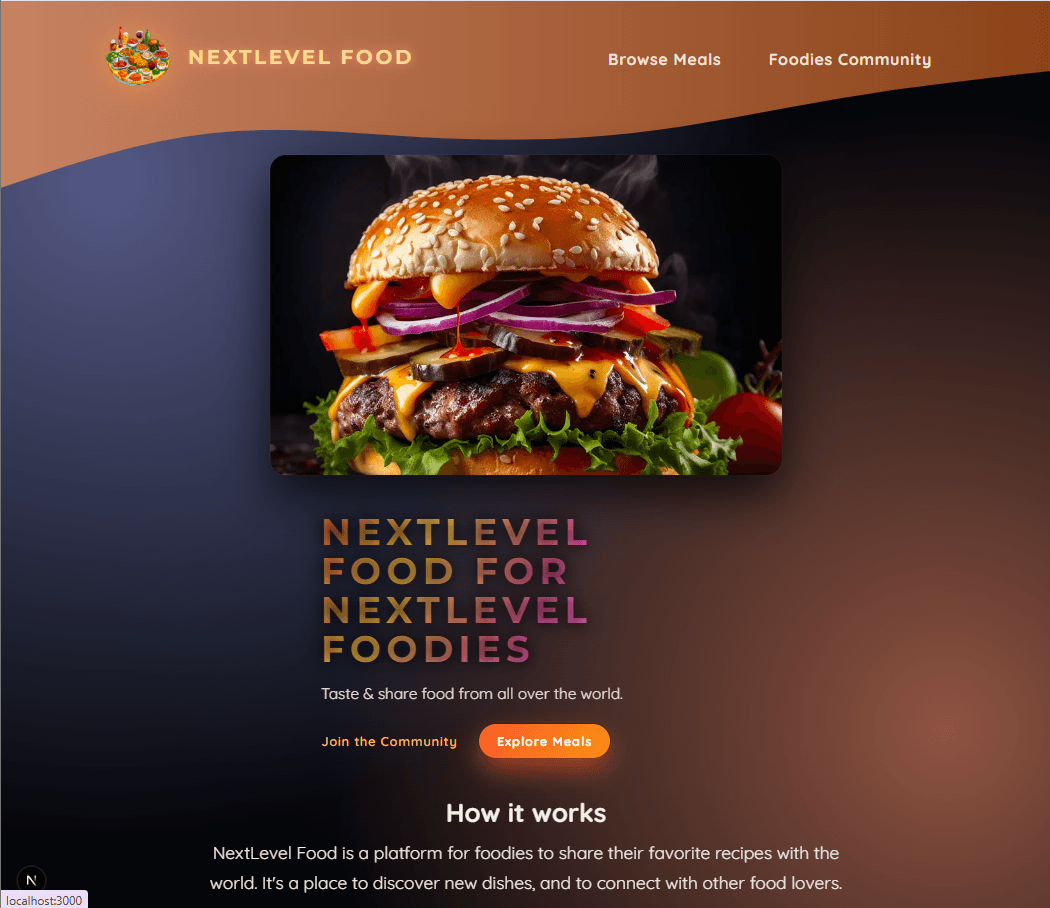
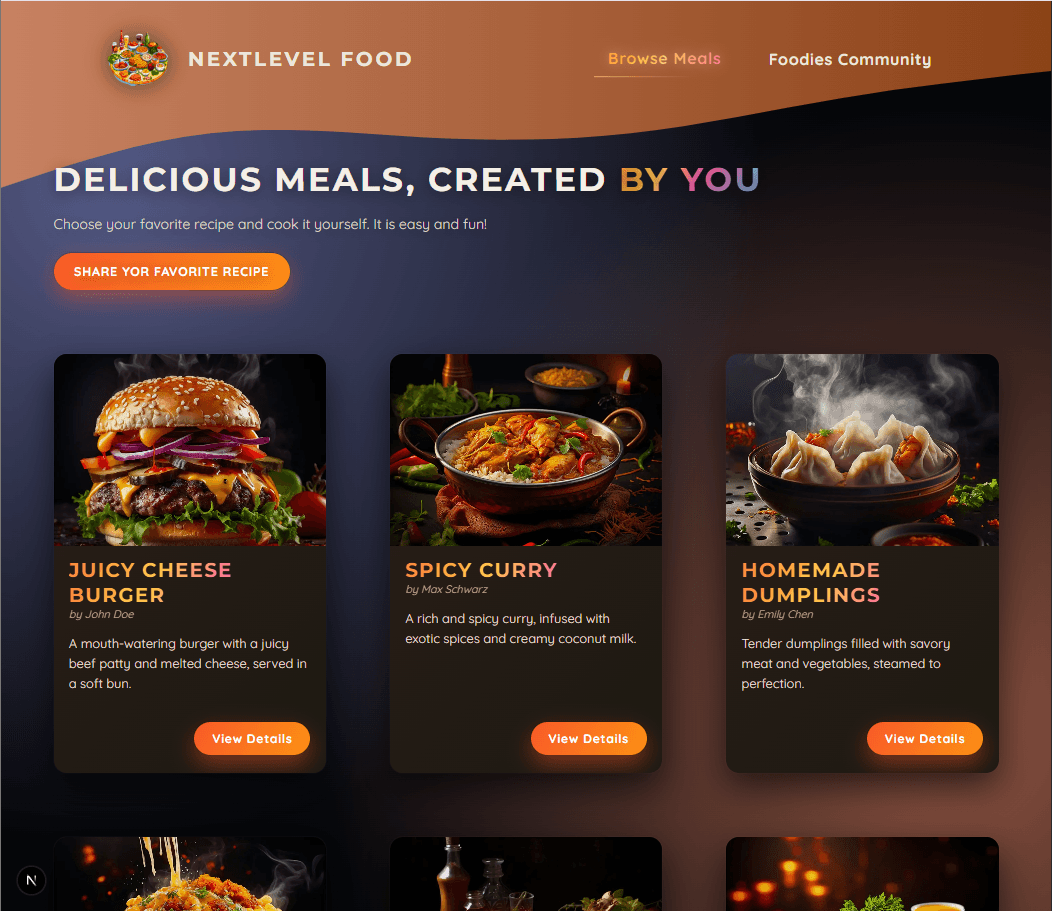
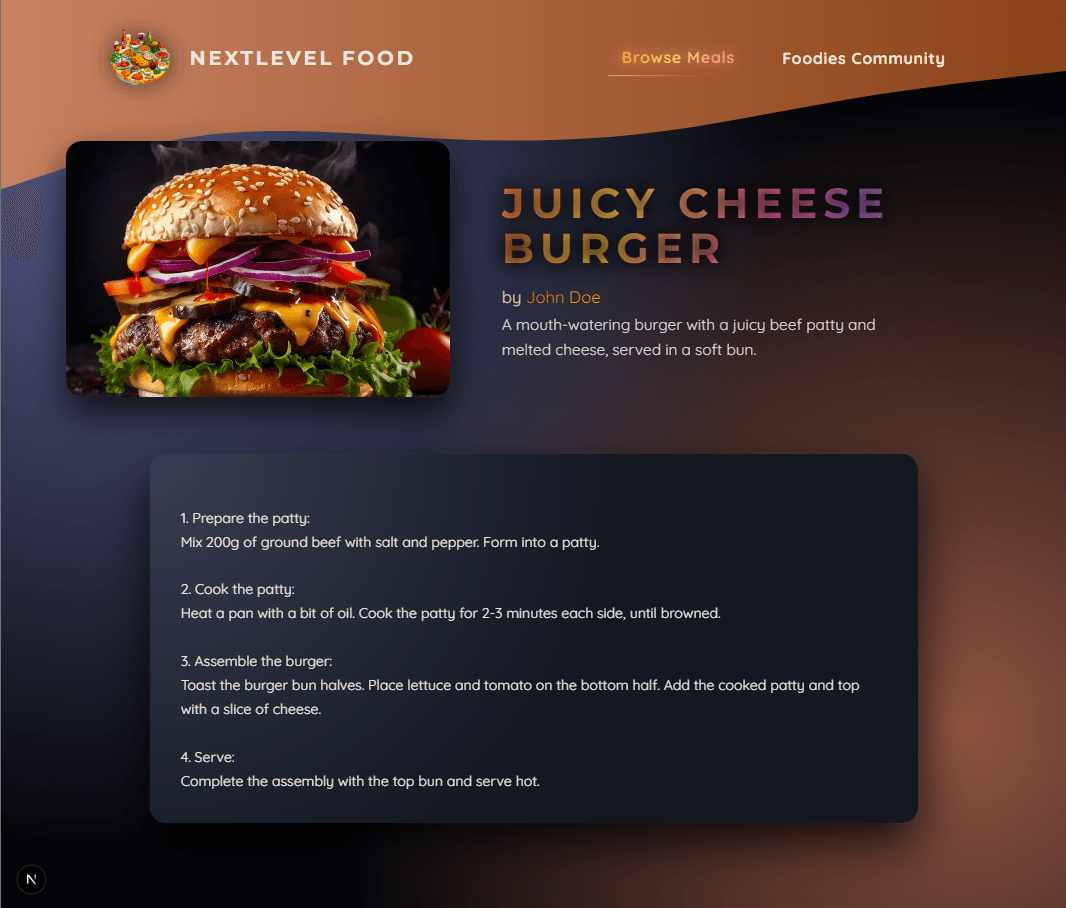
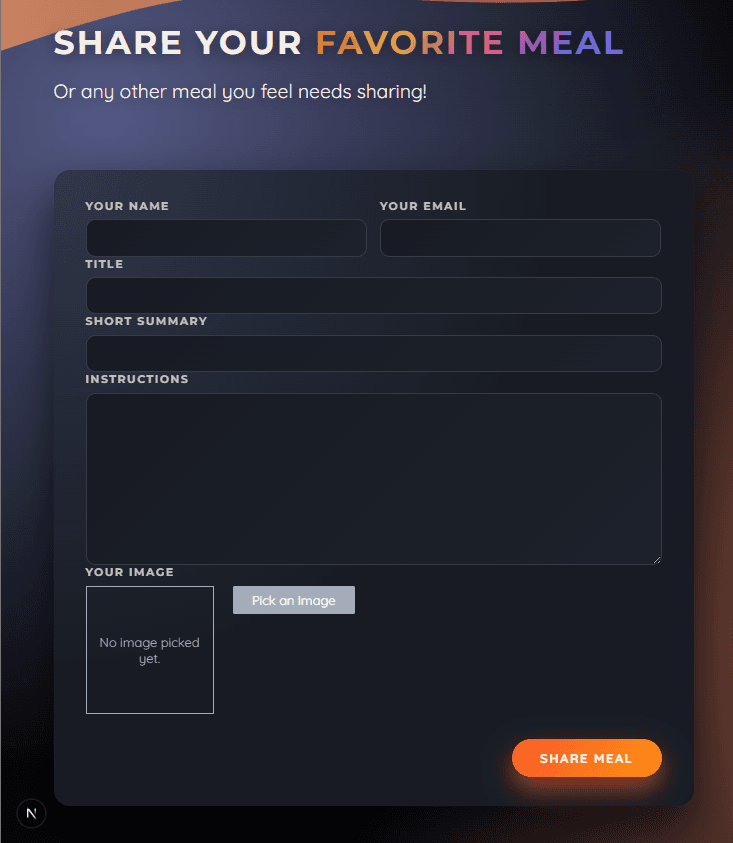
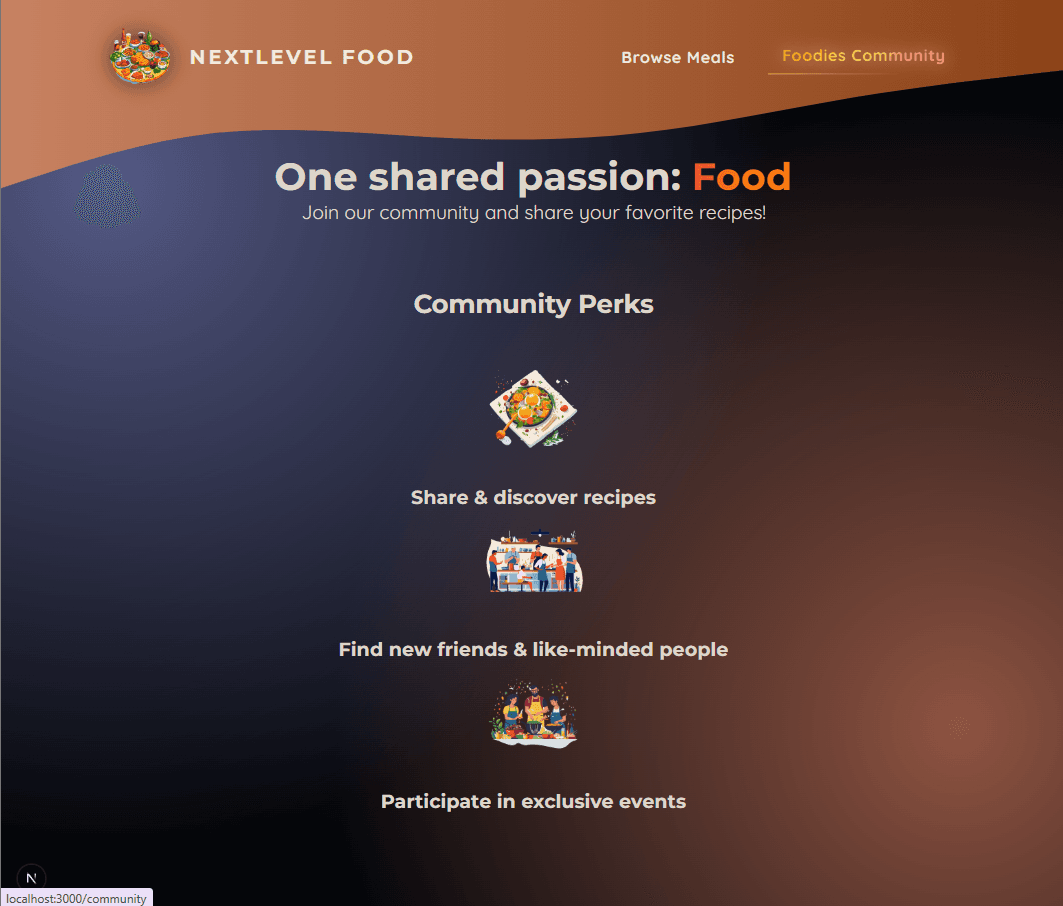
🚀 Quick Links
- 🌐 Live Demo - Explore the full application
- 💻 GitHub Repository - View the source code
📋 Table of Contents
- 🚀 Overview
- ✨ Key Features
- 🛠️ Tech Stack Deep Dive
- 🏗️ App Router Architecture
- 💻 Code Deep Dive
- 🔄 Data Flow & Storage
- 🛡️ Security & Validation
- 🚀 Deployment
🚀 Overview
NextLevel Foodies is a practical, full-stack recipe-sharing platform built entirely with the Next.js 15 App Router. It serves as a comprehensive demonstration of modern full-stack patterns in React, focusing on server-side data management, client-side interactivity, secure file uploads, and persistent local storage using SQLite.
The application provides a complete CRUD-like experience where users can browse community recipes, view detailed cooking instructions, and contribute their own meals—all within a seamless, file-based routing architecture.
✨ Key Features
🍽️ Core Recipe Management
- Browse & Discover - View a grid of all community-shared meals
- Detailed Recipe Pages - Full instructions, images, and creator info
- Share Your Creation - User-friendly form to upload new recipes with images
- Persistent Storage - All data saved in a local SQLite database (
meals.db)
⚡ Modern Next.js 15 Patterns
- App Router Architecture - Leveraging the
/appdirectory for routing, layouts, and server components - Server Components by Default - Efficient data fetching with zero client JavaScript
- Dynamic Metadata - SEO-friendly page titles and descriptions generated per recipe
- Streaming & Suspense - Improved perceived performance with loading states
🔄 Interactive Client Features
- Active Navigation - Highlights the current page using
usePathname() - Image Previews - Real-time file preview before upload using
useRef()anduseState() - Form State Management - Leverages React 19's
useActionState()anduseFormStatus()for pending states and feedback - Responsive Image Handling - Built with the Next.js
Imagecomponent for optimization
🗄️ Full-Stack Data Handling
- Server Actions (
"use server") - Handle form submissions, file uploads, and database writes without separate API routes - File System Operations - Uploaded images are processed and stored in
/public/images - Database Integration - Synchronous SQLite queries using
better-sqlite3for simple, fast data access - Route Revalidation - Automatic cache refresh of meal lists after new submissions using
revalidatePath()
🛠️ Tech Stack Deep Dive
Core Framework & Runtime
- Next.js 15 with App Router - Foundation for routing, rendering, and server-side logic
- React 19 - Utilizes the latest hooks including
useActionStateanduseFormStatus - Node.js File System (
fs) - Handles writing uploaded image files to disk
Data Layer
- SQLite via
better-sqlite3- Embedded database for persistent storage of recipes - Server Components - Direct database queries executed on the server, removing need for client-side data fetching libraries
Utilities & Security
slugify- Creates URL-friendly slugs from recipe titles (e.g., "Best Burger" →best-burger)xssLibrary - Sanitizes user-generated HTML content in recipe instructions to prevent XSS attacks
Styling & Deployment
- CSS Modules - Scoped, component-level styling for maintainability
- Vercel - Platform for seamless deployment and hosting
🏗️ App Router Architecture
The project is a model for structuring applications with the App Router.
Key File Structure
text/app ├── page.js # Homepage (Server Component) ├── meals/ │ ├── page.js # Meal listing (Server Component) │ ├── [mealSlug]/ │ │ └── page.js # Dynamic meal detail page (Server Component) │ └── share/ │ └── page.js # Form to share a meal (Client Component) ├── community/page.js # Community info page (Server Component) └── layout.js # Root layout with header
Server vs. Client Component Strategy
- Server Components (
/meals,/[mealSlug]): Handle data fetching, SEO metadata, and render static HTML. They import and run the better-sqlite3 database driver directly. - Client Components (
/meals/share): Necessary for interactive forms, file pickers, and stateful hooks likeuseStateanduseActionState.
Server Actions: The Backend in Your Frontend
The shareMeal Server Action (in lib/actions.js) exemplifies the modern full-stack approach:
- Receives
FormDatafrom the client. - Validates all inputs (text, email, image).
- Sanitizes instructions with the
xsslibrary. - Processes the uploaded image, saves it to
/public/images. - Inserts the new meal record into the SQLite database.
- Revalidates the
/mealspage cache and redirects the user.
This replaces the need for traditional API route handlers (like pages/api).
💻 Code Deep Dive
Dynamic Recipe Page with SEO Metadata
The app/meals/[mealSlug]/page.js demonstrates Server Components, dynamic routing, and built-in SEO optimization:
jsximport Image from "next/image"; import { notFound } from "next/navigation"; import { getMeal } from "@/lib/meals"; // Next.js automatically calls this to generate page metadata export async function generateMetadata({ params }) { const meal = await getMeal(params.mealSlug); if (!meal) notFound(); return { title: meal.title, description: meal.summary, // SEO description from database }; } export default async function MealDetailsPage({ params }) { const meal = await getMeal(params.mealSlug); if (!meal) notFound(); // Convert newlines to <br> for proper HTML display const instructionsHtml = meal.instructions.replace(/\n/g, "<br />"); return ( <> <header className={classes.header}> <div className={classes.image}> {/* Next.js optimized image with priority loading */} <Image src={meal.image} alt={meal.title} fill priority /> </div> <div className={classes.headerText}> <h1>{meal.title}</h1> <p className={classes.creator}> by{" "} <a href={`mailto:${meal.creator_email}`}> {meal.creator} </a> </p> <p className={classes.summary}>{meal.summary}</p> </div> </header> <main> {/* Safely render sanitized HTML instructions */} <p className={classes.instructions} dangerouslySetInnerHTML={{ __html: instructionsHtml }} /> </main> </> ); }
Key Features
generateMetadata()- Automatically sets page title and description for SEOnotFound()- Built-in 404 handling for invalid meal slugs- Image component - Automatic optimization, lazy loading, and priority loading
- Server-side data fetching - No client-side loading states needed
Community Page with Static Assets
The app/community/page.js shows how to work with static images and create engaging content sections:
jsximport Image from "next/image"; import mealIcon from "@/assets/icons/meal.png"; import communityIcon from "@/assets/icons/community.png"; import eventsIcon from "@/assets/icons/events.png"; export default function CommunityPage() { return ( <> <header className={classes.header}> <h1> One shared passion:{" "} <span className={classes.highlight}>Food</span> </h1> <p>Join our community and share your favorite recipes!</p> </header> <main className={classes.main}> <h2>Community Perks</h2> <ul className={classes.perks}> <li> {/* Static image imports with Next.js optimization */} <Image src={mealIcon} alt="A delicious meal" /> <p>Share & discover recipes</p> </li> <li> <Image src={communityIcon} alt="A crowd of people, cooking" /> <p>Find new friends & like-minded people</p> </li> <li> <Image src={eventsIcon} alt="A crowd of people at a cooking event" /> <p>Participate in exclusive events</p> </li> </ul> </main> </> ); }
Reusable Meal Component
The components/meals/meal-item.js demonstrates component reusability and proper image handling:
jsximport Link from "next/link"; import Image from "next/image"; export default function MealItem({ title, slug, image, summary, creator }) { return ( <article className={classes.meal}> <header> <div className={classes.image}> {/* fill prop makes image cover container */} <Image src={image} alt={title} fill /> </div> <div className={classes.headerText}> <h2>{title}</h2> <p>by {creator}</p> </div> </header> <div className={classes.content}> <p className={classes.summary}>{summary}</p> <div className={classes.actions}> {/* Dynamic link to meal detail page */} <Link href={`/meals/${slug}`}>View Details</Link> </div> </div> </article> ); }
Server Action with Validation
The lib/action.js showcases Server Actions, form validation, and cache revalidation:
jsx"use server"; import { redirect } from "next/navigation"; import { saveMeal } from "./meals"; import { revalidatePath } from "next/cache"; function isInvalidText(text) { return !text || text.trim() === ""; } export async function shareMeal(prevState, formData) { // Extract form data const meal = { title: formData.get("title"), summary: formData.get("summary"), instructions: formData.get("instructions"), image: formData.get("image"), creator: formData.get("name"), creator_email: formData.get("email"), }; // Comprehensive validation if ( isInvalidText(meal.title) || isInvalidText(meal.summary) || isInvalidText(meal.instructions) || isInvalidText(meal.creator) || isInvalidText(meal.creator_email) || !meal.creator_email.includes("@") || !meal.image || meal.image.size === 0 ) { return { message: "Invalid input!" }; // User-friendly error } // Save to database (includes image processing and XSS sanitization) await saveMeal(meal); // Clear cache to show new meal immediately revalidatePath("/meals", "layout"); // Redirect to updated meals list redirect("/meals"); }
Database Layer with Security
The lib/meals.js handles all database operations with security measures:
jsximport sql from "better-sqlite3"; import slugify from "slugify"; import xss from "xss"; const db = sql("meals.db"); export async function saveMeal(meal) { // Create URL-safe slug meal.slug = slugify(meal.title, { lower: true }); // Sanitize HTML to prevent XSS attacks meal.instructions = xss(meal.instructions); // Process uploaded image const extension = meal.image.name.split(".").pop(); const fileName = `${meal.slug}.${extension}`; // Save image to filesystem const stream = fs.createWriteStream(`public/images/${fileName}`); const bufferedImage = await meal.image.arrayBuffer(); stream.write(Buffer.from(bufferedImage)); // Update meal object with image path meal.image = `/images/${fileName}`; // Insert into SQLite database db.prepare( ` INSERT INTO meals (title, summary, instructions, creator, creator_email, image, slug) VALUES (@title, @summary, @instructions, @creator, @creator_email, @image, @slug) `, ).run(meal); }
Security Features in this code:
xss()- Prevents cross-site scripting attacks in user contentslugify()- Creates safe, predictable URLs- File extension validation - Prevents arbitrary file uploads
- Parameterized queries - Prevents SQL injection
🔄 Data Flow & Storage
1. Reading Data (Displaying Meals)
Path: User visits /meals
Process: The Server Component app/meals/page.js calls getMeals() from lib/meals.js.
Execution: This function runs a synchronous SELECT * FROM meals query on the server. The resulting data is passed to Server Components which render the HTML sent to the browser.
2. Writing Data (Sharing a Meal)
Path: User submits the form at /meals/share
Process:
- Form data is sent to the
shareMealServer Action. - Image file is converted to a buffer and written to the filesystem.
- Title is slugified, instructions are sanitized.
- A new row is inserted into the
mealstable. revalidatePath("/meals")tells Next.js to clear the cached meal list.- User is
redirect("/meals")to see their new post.
Database Schema (meals.db)
The SQLite table stores all recipe information:
slug(Primary Key, generated from title)title,summary,instructionscreator,creator_emailimage(path to the uploaded file, e.g.,/images/best-burger.jpg)
🛡️ Security & Validation
The project implements several security best practices suitable for a public-facing application.
Input Validation
The shareMeal action checks for:
- Empty or whitespace-only text fields.
- Valid email format (contains
"@"). - Presence of an uploaded image file.
XSS Prevention
User-submitted recipe instructions (which can contain basic HTML like <br /> for newlines) are passed through the xss sanitization library before being stored in the database. This ensures malicious script tags are neutralized.
File Upload Safety
- Uploads are restricted to the
public/imagesdirectory. - Filenames are derived from the sanitized slug, preventing directory traversal attacks.
- The Next.js
Imagecomponent is used for safe, optimized rendering.
🚀 Deployment
The project is configured for easy deployment on Vercel, the creators of Next.js.
Vercel Setup
- Connecting the GitHub repository triggers automatic deployments.
- The build process detects Next.js and installs dependencies.
- The SQLite database file (
meals.db) is included in the deployment. - The
/public/imagesdirectory is served as static assets.
Environment Considerations
This project uses a local SQLite file. For production-scale applications requiring concurrent writes, this would be replaced with a client-server database like PostgreSQL (using a library like pg), but the better-sqlite3 pattern cleanly demonstrates the Server Component data-fetching model.
🚀 Ready to Explore?