NextEvents - Full-Featured Event Management Platform
Modern event management platform with advanced filtering, real-time comments, and seamless user experience.

NextEvents - Full-Featured Event Management Platform
🚀 Live Demo: Click to Explore the Platform
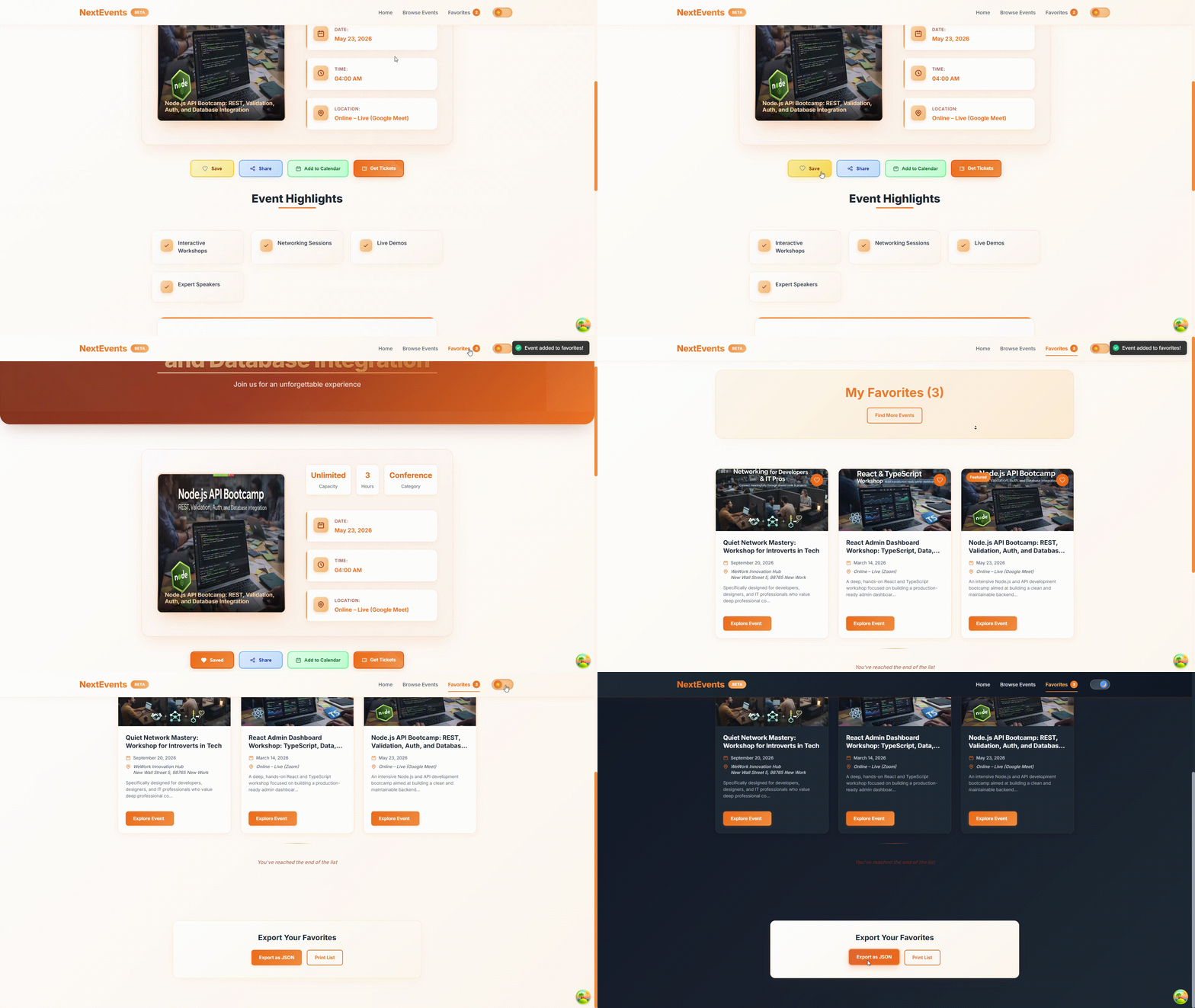
📸 Project Preview
🚀 Quick Links
- 🌐 Live Demo - Explore the full platform
- 💻 GitHub Repository - View the source code
📋 Table of Contents
- 🚀 Overview
- ✨ Key Features
- 🛠️ Tech Stack
- 🏗️ Architecture
- 🎯 Core Components
- ⚡ Build Optimization
- 🚀 Deployment
🚀 Overview
NextEvents is a production-ready event management platform built with Next.js 13. It provides a comprehensive solution for discovering, managing, and participating in events with advanced filtering, real-time interactions, and seamless user experience.
The platform combines cutting-edge frontend technologies with robust backend services to deliver a scalable event management system with excellent performance and user engagement.
✨ Key Features
🎭 Event Management
- Advanced Filtering - Multi-criteria search (date, category, location)
- Interactive Calendar - Google Calendar integration
- Favorites System - Save events with local storage persistence
- Social Sharing - Native share API with clipboard fallback
💬 Community Engagement
- Real-time Comments - Interactive comment system with validation
- Event Ratings - Star-based rating system
- Newsletter Subscription - Email opt-in with database storage
- Social Integration - Share across multiple platforms
🎨 Modern UI/UX
- Dark/Light Themes - Theme toggle with system preference
- Smooth Animations - Framer Motion animations throughout
- Responsive Design - Mobile-first responsive layout
- Loading States - Skeleton screens for better UX
⚡ Performance Optimized
- Image Optimization - Next.js Image component with lazy loading
- Code Splitting - Dynamic imports for heavy components
- Caching Strategies - React Query for efficient data management
- SSR/SSG - Hybrid rendering for optimal performance
🛠️ Tech Stack
Frontend
- Next.js 13 - React framework with SSR/SSG
- TypeScript - Type-safe development
- React 18 - Latest React with concurrent features
- Framer Motion - Production-ready animations
- React Query - Server state management
- React Hook Form - Performant form handling
Backend & Data
- MongoDB - User data and comments storage
- Firebase Realtime Database - Event data storage
- Next.js API Routes - Full-stack API endpoints
- Zod - Schema validation
Styling & UI
- CSS Modules - Scoped component styling
- CSS Variables - Theme management
- React Icons - Comprehensive icon library
- React Hot Toast - Toast notifications
Deployment
- Vercel - Platform with automatic deployments
- GitHub Actions - CI/CD pipeline
- ESLint/Prettier - Code quality tools
🏗️ Architecture
Hybrid Rendering Strategy
- Static Generation - Homepage and event listings
- Server-Side Rendering - Search results and filtered pages
- Incremental Regeneration - Event detail pages
- Client-Side Rendering - Interactive components
Data Flow
- Event Data - Sourced from Firebase Realtime Database
- User Data - Stored in MongoDB (comments, subscriptions)
- Real-time Updates - WebSocket-like functionality via polling
- Client State - Managed via React Context + local storage
Structure
textevent-flow-api/ ├── components/ │ ├── events/ # Event-related components │ ├── event-detail/ # Event detail components │ ├── ui/ # Reusable UI components │ ├── layout/ # Layout components │ ├── input/ # Form input components │ └── icons/ # SVG icon components ├── pages/ │ ├── api/ # API routes │ ├── events/ # Event pages │ ├── favorites/ # Favorites page │ └── index.js # Homepage ├── helpers/ │ ├── api-util.js # API utility functions │ └── db-util.js # Database utilities ├── context/ │ ├── favorites-context.js # Favorites state management │ └── theme-context.js # Theme state management ├── lib/ │ └── react-query.js # React Query configuration ├── styles/ │ └── globals.css # Global styles └── public/ # Static assets
🎯 Core Components
🎯 ActionButtons Component
Interactive action panel featuring:
- Favorite toggle with animations
- Social sharing (native Web Share API)
- Google Calendar integration
- Secure ticket purchase links
📋 EventList Component
Virtualized listing with:
- Infinite scroll using Intersection Observer
- Skeleton loading states
- Priority image loading
- Filter integration
🔍 EventsSearch Component
Advanced search interface:
- Form validation with Zod + React Hook Form
- Custom themed select components
- Dynamic filter management
- Responsive layout
💬 Comments Component
Real-time comment system:
- React Query for efficient data fetching
- Optimistic updates for instant feedback
- Comprehensive form validation
- Pagination support
⚡ Build Optimization
Static Optimization
- Next.js static generation for maximum performance
- Incremental Static Regeneration (ISR) for dynamic content
- Pre-rendered pages with fallback strategies
- Route-based static optimization
Image Optimization
- Next.js Image component with automatic optimization
- WebP format conversion with fallback support
- Lazy loading with intersection observer
- Responsive images with multiple size variants
- Blur-up placeholders for better UX
Code Splitting
- Automatic route-based code splitting
- Dynamic imports for heavy components
- Library optimization with tree shaking
- Chunk optimization for faster initial load
- Prefetching for anticipated navigation
Bundle Analysis
- Webpack bundle analyzer integration
- Performance budgets for bundle size
- Third-party library impact monitoring
- Code coverage analysis
- Lighthouse CI integration
🚀 Deployment
Vercel Setup
- Automatic Git integration
- Preview deployments for PRs
- Global CDN distribution
- Automatic SSL certificates
Environment Variables
envMONGODB_URI=your_mongodb_connection_string NEXT_PUBLIC_FIREBASE_CONFIG=your_firebase_config
🤝 Contributing
Contributions are welcome! Please feel free to submit a Pull Request.
- Fork the repository
- Create your feature branch (
git checkout -b feature/AmazingFeature) - Commit your changes (
git commit -m 'Add some AmazingFeature') - Push to the branch (
git push origin feature/AmazingFeature) - Open a Pull Request
🚀 Ready to Explore?