Docker for Frontend Developers: Beyond 'It Works on My Machine'
Transform your frontend development workflow with Docker. Learn how containerization solves real-world problems in modern web development, from eliminating 'works on my machine' issues to streamlining CI/CD pipelines. Discover practical patterns for React, Vue, and Next.js applications that ensure consistent environments across every stage.
Docker for Frontend Developers: Beyond 'It Works on My Machine'
As a frontend developer, you've probably heard of Docker. Maybe you've even tried running docker run nginx once or twice. But Docker is so much more than just another tool in your toolbox—it's a paradigm shift in how we build, ship, and run applications. Let's explore why Docker matters for frontend developers and how it can transform your development workflow.
The Modern Frontend Development Nightmare
Picture this: You've built a beautiful React application. It works perfectly on your MacBook. You send it to your colleague who's using Windows. Suddenly, there are path issues, Node version conflicts, and environment variables that don't load. Your designer can't run the project at all because they don't have Node installed. The QA team reports bugs that you can't reproduce. Sound familiar?
This is the problem Docker solves. It's not about "it works on my machine" anymore—it's about "it works on every machine."
Why Frontend Developers Need Docker
1. Consistent Development Environments
No more "Can you check the Node version?" or "What version of npm are you running?" Docker ensures that everyone on your team—developers, designers, QA—runs the exact same environment.
2. Simplified Onboarding
New team member? Instead of spending days setting up their environment, they run docker-compose up and start coding in minutes.
3. Microservices Architecture
Modern frontends often connect to multiple backend services. Docker makes it easy to spin up your entire ecosystem locally.
4. Production Parity
Develop, test, and deploy in the same environment. The infamous "it worked in development" bug becomes a thing of the past.
How Docker Actually Works
Before we dive into frontend specifics, let's understand Docker's architecture:
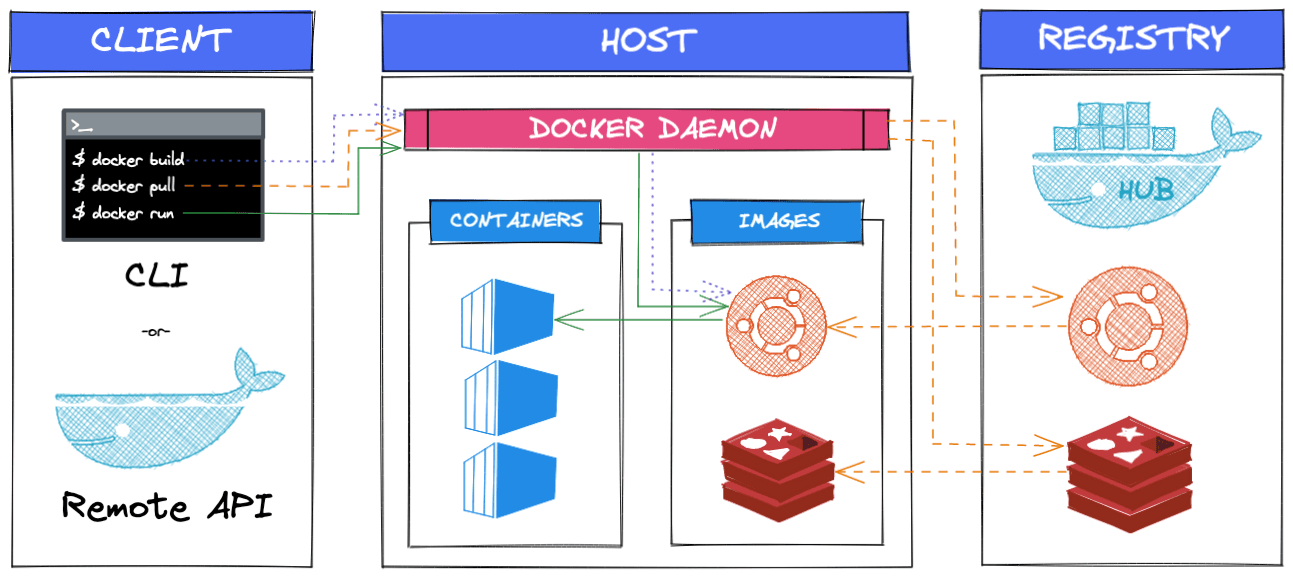
Diagram: Docker client-server architecture with registry integration
Key Components:
- Docker Client: Your terminal commands (
docker build,docker run) - Docker Daemon: The background service managing containers
- Docker Images: Blueprints for containers (like a class in OOP)
- Docker Containers: Running instances of images (like objects)
- Docker Registry: Where images are stored (Docker Hub is the default)
The Magic of Docker for Frontend Development
Solving the Node.js Version Hell
Remember when Node 16 broke your build, but your project needed Node 14? With Docker:
dockerfile# Dockerfile FROM node:18-alpine WORKDIR /app COPY package*.json ./ RUN npm ci --only=production COPY . . EXPOSE 3000 CMD ["npm", "start"]
Now, everyone runs Node 18. No exceptions. No conflicts. No "but it works on my machine."
Frontend Development Architecture with Docker
Let's look at how Docker fits into a modern frontend development workflow:
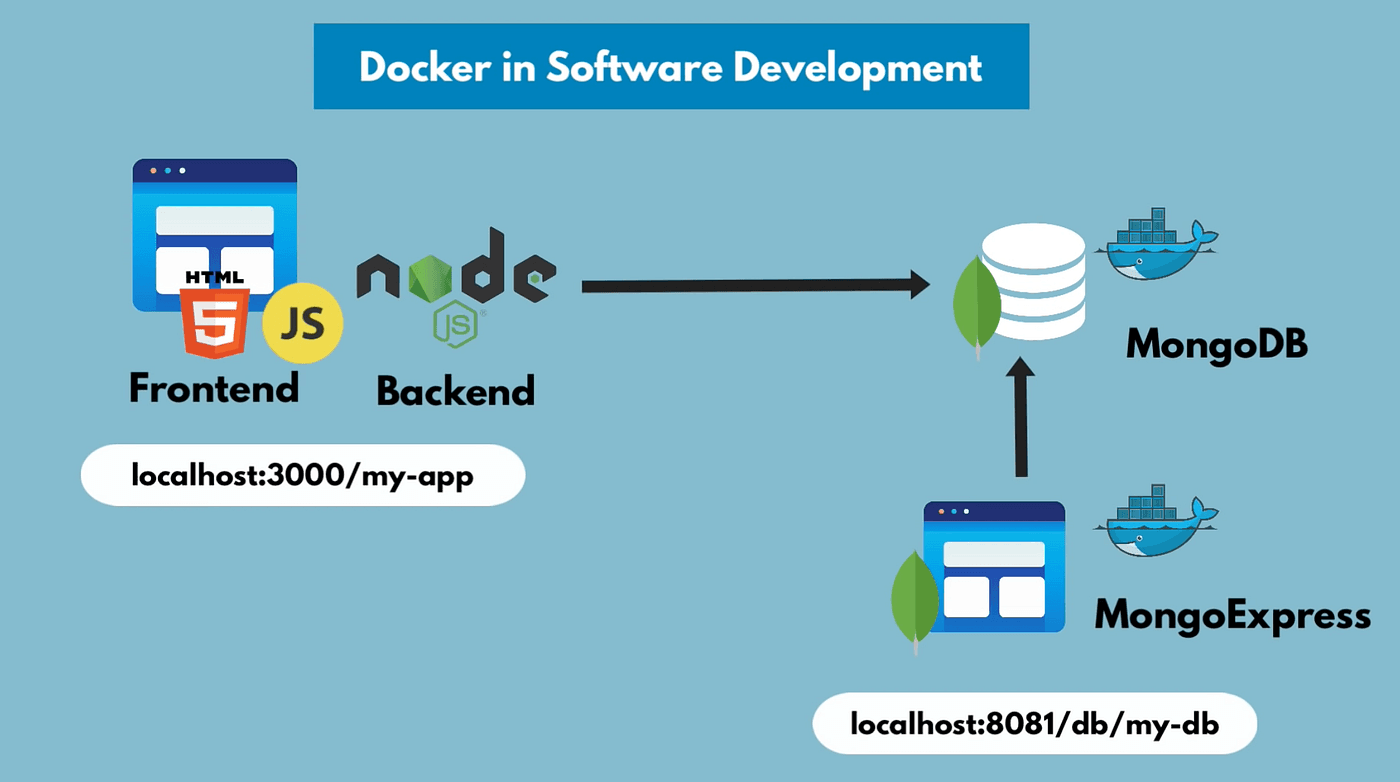
Diagram: Frontend-backend microservices architecture with Docker
Real-World Docker Scenarios for Frontend Developers
Scenario 1: The Monorepo Challenge
You're working on a project with multiple frontend apps (admin panel, customer portal, marketing site) that share components. Without Docker:
bash# Without Docker cd admin-panel && npm install && npm start # New terminal cd customer-portal && npm install && npm start # Another terminal cd shared-components && npm install && npm run build:watch
With Docker Compose:
yaml# docker-compose.yml version: "3.8" services: admin-panel: build: ./admin-panel ports: - "3000:3000" volumes: - ./admin-panel:/app - /app/node_modules customer-portal: build: ./customer-portal ports: - "3001:3000" volumes: - ./customer-portal:/app - /app/node_modules shared-components: build: ./shared-components volumes: - ./shared-components:/app command: npm run build:watch
One command: docker-compose up. All three services running, hot-reloading, and talking to each other.
Scenario 2: The Backend Dependency Dance
Your frontend depends on:
- Authentication service (port 3001)
- API gateway (port 3002)
- WebSocket server (port 3003)
- Mock data service for development (port 3004)
Instead of running each manually or relying on unstable shared development servers:
yaml# docker-compose.dev.yml services: frontend: build: . ports: ["3000:3000"] volumes: - .:/app - /app/node_modules depends_on: - auth-service - api-gateway - websocket-server - mock-service auth-service: image: company/auth-service:latest ports: ["3001:3000"] api-gateway: image: company/api-gateway:latest ports: ["3002:3000"] websocket-server: image: company/websocket-server:latest ports: ["3003:3000"] mock-service: image: mockserver/mockserver ports: ["3004:1080"]
Your entire development environment in one file.
Docker Performance: Myths and Realities
Myth: "Docker is slow for frontend development"
Reality: With proper volume mounting and caching, Docker can be just as fast as native development.
Optimization Tips for Frontend Development:
dockerfile# Multi-stage build for optimal caching FROM node:18-alpine AS builder WORKDIR /app COPY package*.json ./ # Layer for dependencies (caches separately) RUN npm ci COPY . . RUN npm run build # Production image FROM nginx:alpine COPY /app/build /usr/share/nginx/html COPY nginx.conf /etc/nginx/nginx.conf EXPOSE 80
Volume Mounting for Hot Reload:
yaml# docker-compose.yml services: frontend: build: . ports: - "3000:3000" volumes: # Mount source code for hot reload - .:/app # Prevent overwriting node_modules - /app/node_modules # For specific frameworks - ./.next:/app/.next # Next.js - ./dist:/app/dist # Vue/React build output environment: - CHOKIDAR_USEPOLLING=true # For file watching in Docker
Docker in Your CI/CD Pipeline
Traditional CI/CD:
yaml# .github/workflows/deploy.yml (without Docker) - name: Setup Node.js uses: actions/setup-node@v3 with: node-version: "18" - name: Install dependencies run: npm ci - name: Build run: npm run build - name: Deploy run: ./deploy-script.sh
Docker-Powered CI/CD:
yaml# .github/workflows/deploy.yml (with Docker) - name: Build Docker image run: docker build -t my-app:${{ github.sha }} . - name: Push to registry run: docker push my-registry.com/my-app:${{ github.sha }} - name: Deploy to production run: | ssh server "docker pull my-registry.com/my-app:${{ github.sha }}" ssh server "docker-compose up -d"
Benefits:
- Consistent build environment
- No need to install dependencies on CI server
- Artifact is a Docker image (not just code)
- Easy rollbacks (just switch to previous image tag)
Advanced Docker Patterns for Frontend
Pattern 1: Development vs Production Configuration
dockerfile# Base Dockerfile FROM node:18-alpine AS base WORKDIR /app COPY package*.json ./ # Development stage FROM base AS development RUN npm install COPY . . CMD ["npm", "run", "dev"] # Build stage FROM base AS builder RUN npm ci --only=production COPY . . RUN npm run build # Production stage FROM nginx:alpine AS production COPY /app/dist /usr/share/nginx/html COPY nginx.conf /etc/nginx/nginx.conf CMD ["nginx", "-g", "daemon off;"]
Build for development: docker build --target development -t my-app:dev .
Build for production: docker build --target production -t my-app:prod .
Pattern 2: Multi-Architecture Builds
bash# Build for multiple platforms docker buildx build --platform linux/amd64,linux/arm64 \ -t my-app:latest \ --push .
Now your app runs on:
- Intel/AMD servers (cloud providers)
- Apple Silicon (M1/M2/M3 Macs)
- Raspberry Pi (edge deployments)
Pattern 3: Health Checks and Self-Healing
dockerfileFROM node:18-alpine # ... build steps ... HEALTHCHECK \ CMD curl -f http://localhost:3000/health || exit 1
Docker will automatically restart unhealthy containers.
Docker Security for Frontend Applications
Best Practices:
- Use minimal base images:
dockerfileFROM node:18-alpine # 5x smaller than node:18 # Instead of FROM node:18 # Much larger, includes unnecessary tools
- Run as non-root user:
dockerfileRUN addgroup -g 1001 -S nodejs RUN adduser -S nextjs -u 1001 USER nextjs
- Scan for vulnerabilities:
bashdocker scan my-app:latest
- Use .dockerignore:
textnode_modules .git \*.log .env Dockerfile README.md
The Developer Experience Revolution
Before Docker:
textNew developer joins team ↓ Reads 10-page setup document ↓ Installs Node, npm, Redis, PostgreSQL, etc. ↓ Spends 2 days debugging environment issues ↓ Finally starts coding
After Docker:
textNew developer joins team ↓ Installs Docker ↓ Runs: git clone && docker-compose up ↓ Starts coding immediately
Common Pitfalls and Solutions
Pitfall 1: Slow File Watching
Solution: Use CHOKIDAR_USEPOLLING=true or bind mounts with proper inotify settings.
Pitfall 2: Memory Issues
Solution: Limit container resources:
yamlservices: frontend: deploy: resources: limits: memory: 512M reservations: memory: 256M
Pitfall 3: Docker Desktop Licensing
Solution: Use Docker alternatives for development:
- Podman (open-source, Docker-compatible)
- Rancher Desktop
- Colima (for macOS)
Docker Ecosystem for Frontend Developers
Essential Tools:
- Docker Compose - Multi-container applications
- Docker Buildx - Advanced building (multi-arch, cache management)
- Docker Scout - Security scanning
- Docker Context - Manage multiple Docker environments
- Watchtower - Automatic container updates
Frontend-Specific Images:
- node:18-alpine - For building
- nginx:alpine - For serving static files
- caddy:alpine - Automatic HTTPS
- traefik:latest - Reverse proxy with Let's Encrypt
Future of Frontend Development with Docker
Trend 1: Development Containers
VSCode Dev Containers allow you to define your development environment as code:
json// .devcontainer/devcontainer.json { "name": "React Dev Container", "dockerFile": "Dockerfile", "settings": { "terminal.integrated.shell.linux": "/bin/bash" }, "extensions": ["dbaeumer.vscode-eslint", "esbenp.prettier-vscode"], "forwardPorts": [3000] }
Trend 2: Cloud Development Environments
GitHub Codespaces, Gitpod, and similar services use Docker containers as development environments in the cloud.
Trend 3: Edge Deployments
Deploy your frontend to edge networks using Docker:
bash# Deploy to Fly.io flyctl deploy --dockerfile Dockerfile # Deploy to Railway railway up --docker
Getting Started: Your First Frontend Docker Project
Step-by-Step Setup:
- Create your project:
bashnpx create-react-app my-docker-app cd my-docker-app
- Create Dockerfile:
dockerfile# Dockerfile FROM node:18-alpine AS development WORKDIR /app COPY package*.json ./ RUN npm install COPY . . EXPOSE 3000 CMD ["npm", "start"]
- Create docker-compose.yml:
yaml# docker-compose.yml version: "3.8" services: frontend: build: . ports: - "3000:3000" volumes: - .:/app - /app/node_modules environment: - CHOKIDAR_USEPOLLING=true
- Run it:
bashdocker-compose up # Visit http://localhost:3000
When NOT to Use Docker for Frontend
Docker isn't always the right tool:
- Simple static websites - Netlify/Vercel might be simpler
- Quick prototypes - Overhead might slow you down
- When team is resistant - Culture change takes time
- Resource-constrained environments - Old laptops with 4GB RAM
Recommended Resources
- Docker Official Documentation - Start here
- Docker for Frontend Developers Course - Frontend Masters
- Docker Cheat Sheet - Quick reference
- Awesome Docker - Curated list
- Container Solutions - Advanced patterns
Practice Projects
- Dockerize a React/Vue/Next.js app with hot reload
- Create a multi-service frontend (admin + customer portal)
- Set up CI/CD with Docker for a frontend project
- Optimize Docker image size for a production app
- Create a development container for your team
Conclusion: The New Frontend Development Standard
Docker for frontend development isn't about adding complexity—it's about removing inconsistency. It's about spending less time on environment issues and more time building amazing user experiences.
The transition might feel overwhelming at first, but the payoff is immense:
- No more environment bugs
- Faster onboarding
- Production-like local development
- Simplified CI/CD
- Team consistency
Remember: Docker isn't just for backend developers or DevOps engineers. As frontend applications grow in complexity and importance, containerization becomes essential knowledge for every serious frontend developer.
Start small. Dockerize one project. Experience the "it just works" magic. Then, gradually incorporate Docker into your workflow. Before you know it, you'll wonder how you ever developed without it.
The future of frontend development is containerized. Are you ready?
Your Docker Journey Starts Now: Choose one frontend project—any project—and create a Dockerfile for it. Then, share it with a colleague and watch it "just work" on their machine. That moment of magic is why Docker matters for frontend developers.