Docker & Kubernetes Complete - From Single Containers to Compose and K8s
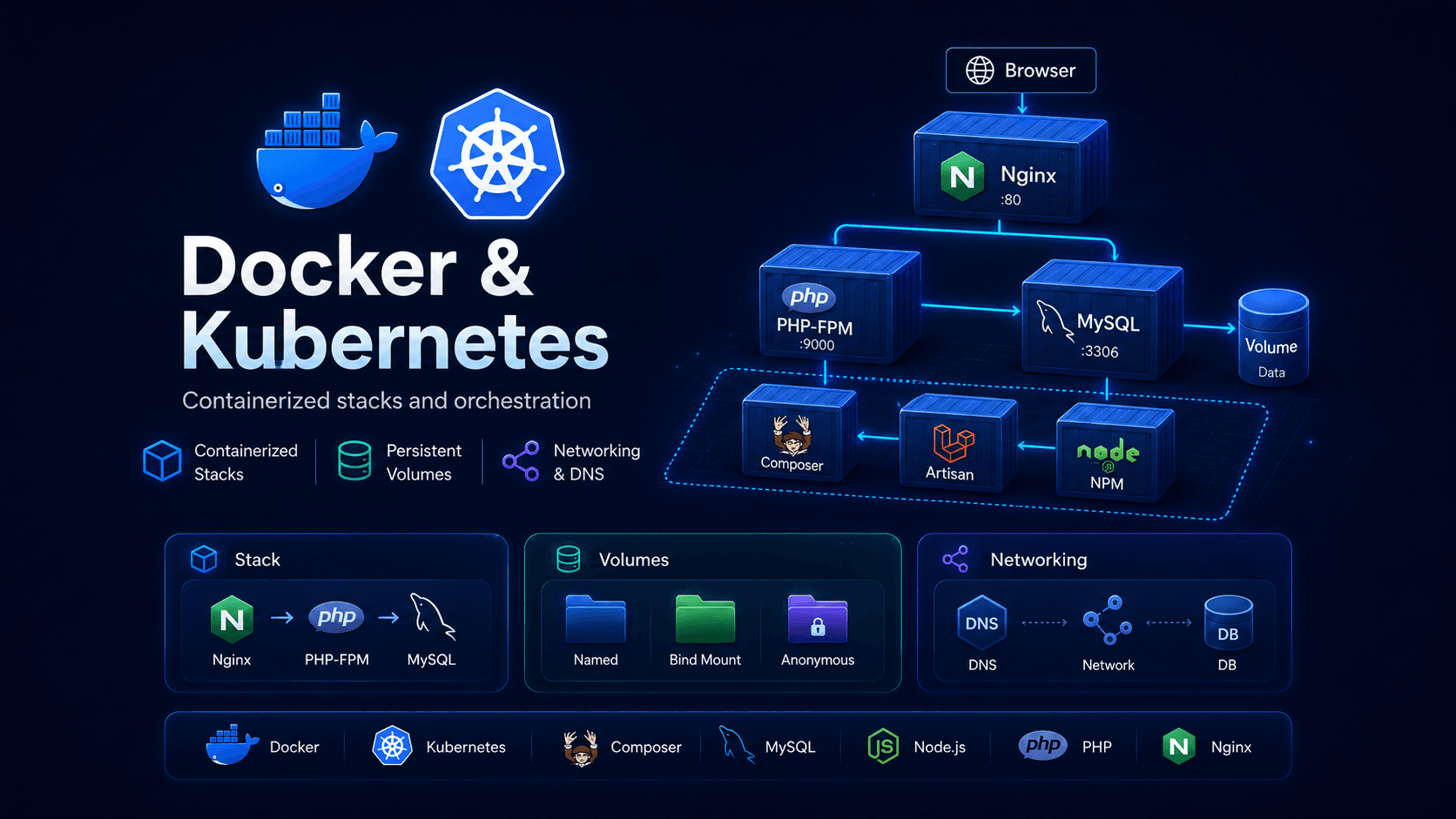
A multi-branch educational repository that walks the full container journey: single-container runs, cross-container networking, volumes, Docker Compose orchestration, a production-style PHP stack, and the step up into Kubernetes — clusters, control plane, and worker nodes.
Docker & Kubernetes Complete - From Single Containers to Compose and K8s
💻 View on GitHub: Docker-Kubernetes-Complete
🚀 Quick Links
- 💻 GitHub Repository - View the full source code and all branches
📋 Table of Contents
- 🚀 Overview
- 🗂️ What the Repository Covers
- 🧱 Docker Image Lifecycle
- 🗃️ Data Persistence: Volumes and Bind Mounts
- 🌐 Cross-Container Networking
- 🧩 Multi-Container Goals Application
- 🐳 Declarative Orchestration with Docker Compose
- 🐘 Production-Style PHP / Laravel Stack
- ☸️ Stepping Up to Kubernetes
- 🧠 Kubernetes Control Plane
- 🛠️ Kubernetes Worker Nodes
- 🎯 Why This Repository Stands Out
🚀 Overview
Docker & Kubernetes Complete is a multi-branch educational repository that walks the full container journey from the very first docker run command to a multi-service Compose stack and the topology of a Kubernetes cluster. Each branch in the repository isolates one concept — single containers, networking, volumes, Compose, a PHP stack, Kubernetes — so the ideas can be studied independently before being combined.

The diagram above summarises the model that ties every branch together: code is built into an image, the image is pushed to a registry, and the registry is what the production host pulls from. Every Docker concept in this repository — Dockerfiles, networks, volumes, Compose, Kubernetes — is ultimately about controlling this lifecycle.
The repository is organised so that each topic builds on the previous one:
- Single-container basics — images, tags, ports, detached mode
- Multi-container apps — user-defined networks and hostname-based DNS
- Persistence — named volumes, bind mounts, anonymous volumes
- Compose — declarative service topology in YAML
- Production-style stack — Nginx + PHP-FPM + MySQL + Composer + Artisan + NPM
- Kubernetes — clusters, control plane, worker nodes
The point is not to ship an application. The point is to make the underlying container model explicit, reproducible, and easy to reason about.
🗂️ What the Repository Covers
Each branch in the repository encodes one self-contained study:
| Branch theme | Concept under study |
| --- | --- |
| Multi-container goals app | Container-to-container DNS over a user-defined network |
| Docker volumes demo | Named volumes, bind mounts, anonymous volumes |
| Docker networking | Cross-container communication without hard-coded IPs |
| Docker Compose stack | Declarative service topology in docker-compose.yaml |
| Dockerized Laravel / PHP stack | Production-style separation: Nginx, PHP-FPM, MySQL, tooling containers |
| Kubernetes | Cluster topology, control plane, worker nodes |
The application code in each branch is intentionally simple — a goals API, a feedback form, a favorites API, a Laravel skeleton. The container architecture around it is the actual subject.
🧱 Docker Image Lifecycle
Before any of the orchestration topics make sense, the image lifecycle has to be solid: how images are built, how they are tagged and pushed to a registry, and how containers are launched from them.
Building Images from a Dockerfile
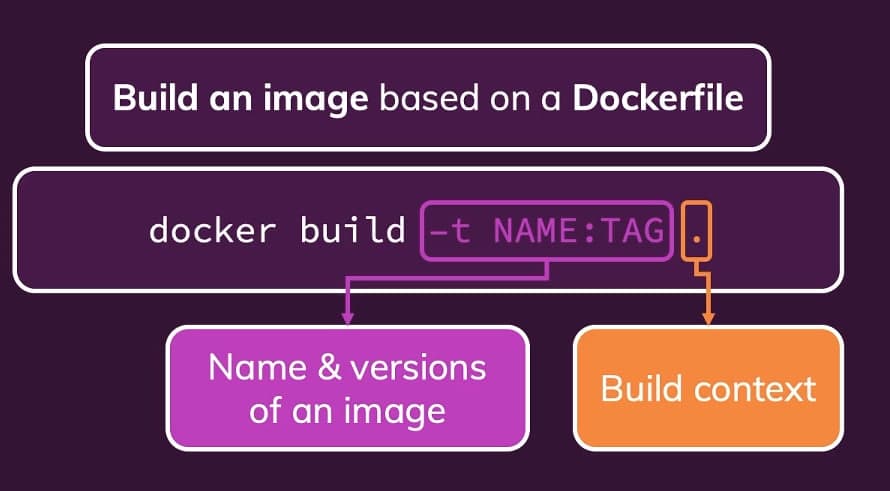
Every service in the repository is built from a small, focused Dockerfile. For example, the backend image in the multi-container goals branch:
dockerfileFROM node WORKDIR /app COPY package.json . RUN npm install COPY . . EXPOSE 80 ENV MONGODB_USERNAME figraco ENV MONGODB_PASSWORD secret CMD ["npm", "start"]
Key decisions encoded here:
WORKDIR /appfixes a consistent path inside the imageCOPY package.json .+RUN npm installis placed before the rest of the source so dependency installs sit in their own cache-friendly layerEXPOSE 80documents the runtime port for tooling and humansENVprovides safe defaults that can be overridden atdocker runtime
Build the images from the project root:
bashdocker build -t goals-node ./backend docker build -t goals-react ./frontend
Image Registry Workflow

Once an image is built, it can be tagged for a registry and pushed there so other machines (or a Kubernetes cluster) can pull it back down. The repository publishes a worked example image to Docker Hub:
textlyalkin/docker_kubernetes_complete:backend sha256:30fc94064d5e043395098cba980cf8650656c6cee2ff3f7251d1a7ef0f0e43c5
This is the moment where a local artifact becomes a portable artifact — and the same image digest can be pulled by any environment that authenticates to the registry.
Running Containers Standalone
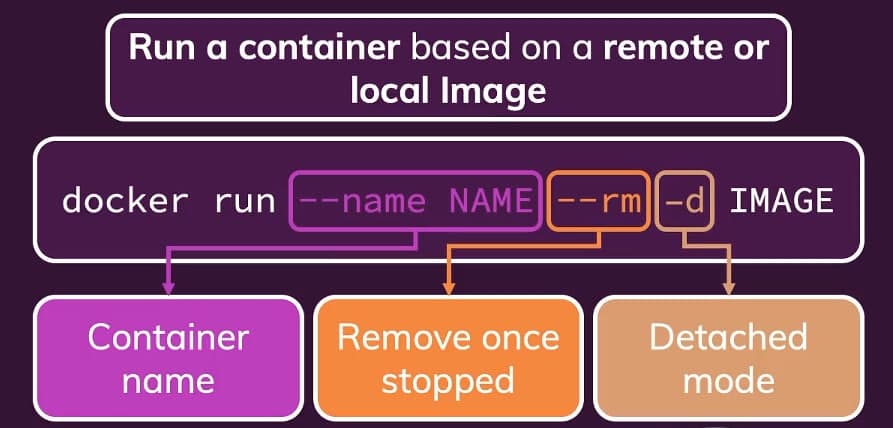
Before introducing Compose or Kubernetes, the repository runs each container by hand so the flags become muscle memory. A minimal MongoDB run with explicit network membership:
bashdocker run --name mongodb --rm -d --network goals-net mongo
Each flag has a purpose:
--name mongodbgives the container a stable DNS name on the network--rmremoves the container automatically after it stops-druns detached so the shell stays free--network goals-netattaches the container to a user-defined bridge network
Once these flags are second nature, every higher-level abstraction — Compose, Kubernetes manifests — reads as syntactic sugar on top of them.
🗃️ Data Persistence: Volumes and Bind Mounts
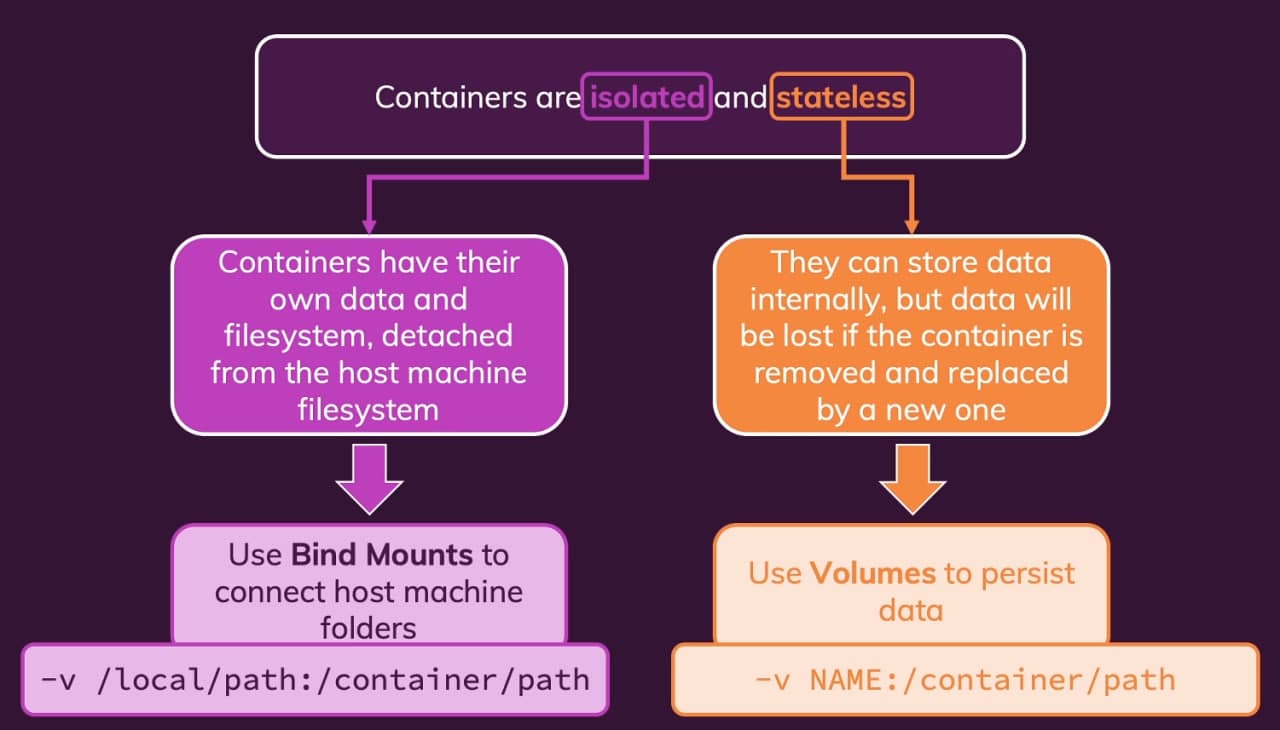
A dedicated branch (a small Node.js / Express feedback application) is built around one question: where does data live when the container is gone? The answer is three different storage primitives, each with a different intent.
Three Storage Primitives Working Together
bashdocker run \ -p 3000:8000 \ -d --rm --env PORT=8000 \ --name feedback-app \ -v feedback:/app/feedback \ -v ".../Docker/data-volumes-3.1:/app" \ -v /app/temp \ -v /app/node_modules \ feedback-node:volumes
That single command is the entire lesson, broken down:
-v feedback:/app/feedback— a named volume for persistent user data. Survives--rmand image rebuilds. This is where real application data should live.-v ".../Docker/data-volumes-3.1:/app"— a bind mount of the project directory for development. Local source changes are reflected instantly inside the container.-v /app/temp— an anonymous volume for transient scratch space. Isolated from the bind mount above so temp writes do not leak onto the host.-v /app/node_modules— an anonymous volume that protects container-installed dependencies from being shadowed by the host bind mount.
Why the Order Matters
Because /app is bind-mounted from the host, the more specific mounts for /app/feedback, /app/temp, and /app/node_modules override that parent mount inside those directories. This is exactly the pattern that makes containerised Node.js development workable:
- source code comes from the host
- dependencies live inside the container
- user data is persisted in a Docker-managed volume
- temp files stay isolated
If you understand this single docker run line, you understand 90 % of real-world container storage.
🌐 Cross-Container Networking
A separate branch focuses purely on networking through a tiny Node.js + MongoDB favorites API. The decisive line is the Mongo connection string in app.js:
textmongodb://mongodb:27017/swfavorites
Here mongodb is not a localhost reference. It is the container name, resolved by Docker's internal DNS once both containers join the same user-defined bridge network.
The Recipe
bashdocker network create favorites-net docker run -d --name mongodb --network favorites-net mongo docker run -d \ --name favorites \ -p 3000:3000 \ --network favorites-net \ favorites-node
That is it. No port publishing for MongoDB, no IP addresses, no /etc/hosts hacks — just a stable hostname guaranteed by Docker's networking layer.
Why a User-Defined Bridge
Docker's default bridge network does not give you DNS resolution by container name. A user-defined bridge does, plus it isolates the application's containers from unrelated ones on the host. That difference is why every real multi-container example in this repository starts with docker network create.
Lessons from the Console
The branch's recorded console session has several real-world gotchas worth keeping:
docker stop favorites-nodefailed becausefavorites-nodeis an image name, while the actual container name wasfavorites— stop targets are containers, not images- starting a new MongoDB container with the same name failed while a stopped container named
mongodbstill existed — Docker requires unique names even for stopped containers - containers started with
--rmdisappeared after exit, which then explained the laterNo such containerresponses fordocker logs
These are the kinds of friction points that make networking and lifecycle click together.
🧩 Multi-Container Goals Application
The goals branch puts everything from the previous sections into one runnable system: a React frontend, a Node.js / Express backend, and a MongoDB database — three separate containers wired together by Docker, without Docker Compose.
Topology
textBrowser | | http://localhost:3000 v frontend-react container | | browser request to http://localhost/goals v goals-backend container | | Docker network DNS: mongodb:27017 v mongodb container
The crucial detail: the browser makes the request to http://localhost/goals because the browser runs on the host machine, not inside any container. The backend then talks to MongoDB by the internal hostname mongodb. Two different networks, two different hostnames, one coherent system.
Recommended Development Run
bashdocker network create goals-net docker run --name mongodb -v data:/data/db --rm -d \ --network goals-net \ -e MONGO_INITDB_ROOT_USERNAME=figraco \ -e MONGO_INITDB_ROOT_PASSWORD=secret \ mongo docker run --name goals-backend --rm \ -v logs:/app/logs \ -v D:/arst.hw/sv.code/Docker/multi-container/backend:/app \ -v /app/node_modules \ -e MONGODB_USERNAME=figraco \ -e MONGODB_PASSWORD=secret \ -d -p 80:80 \ --network goals-net \ goals-node docker run --name frontend-react --rm -p 3000:3000 -it \ -e CHOKIDAR_USEPOLLING=true \ -v D:/arst.hw/sv.code/Docker/multi-container/frontend:/app \ -v /app/node_modules \ goals-react
Every flag in this triple is something the earlier branches taught individually: user-defined network, named volume for the database, bind mount for the source, anonymous volume for node_modules, environment-based credentials, and CHOKIDAR_USEPOLLING=true so React's file watcher works reliably inside a Linux container on a Windows host.
Important Distinctions Encoded Here
localhostinside the backend container would mean the backend itself, not MongoDBmongodbworks as a hostname only because both containers sharegoals-net- the React frontend is served from a container, but its
fetch("http://localhost/goals")runs in the browser on the host - MongoDB does not need a published host port — only the backend talks to it
--rmremoves the container after exit, but named volumes survive
The branch also captures a subtle bug worth remembering — case-sensitive paths inside the Linux container:
textcat: /app/src/components/CourseGoals/CourseGoals.js: No such file or directory
The actual path was /app/src/components/goals/CourseGoals.js. On a Linux filesystem, CourseGoals/ and goals/ are different directories. This is the kind of thing that only bites once you start running the same code inside a container.
🐳 Declarative Orchestration with Docker Compose
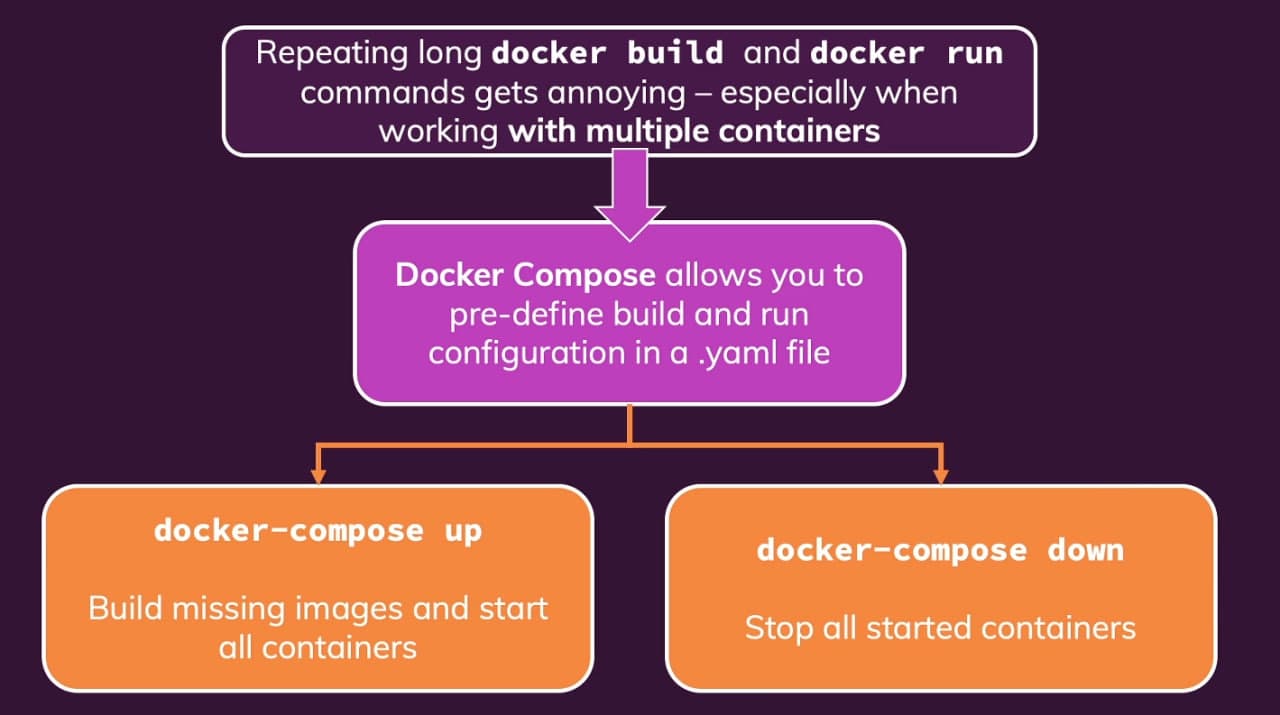
Once the manual multi-container workflow is understood, Docker Compose becomes the natural next step. Instead of running three docker run commands with carefully orchestrated flags, the same topology is encoded once in docker-compose.yaml and brought up with a single command.
What the Compose File Encodes
The Compose branch coordinates three services:
mongodb— database service based on the officialmongoimagebackend— Node.js API built from./backendfrontend— React development server built from./frontend
And in doing so, it formalises:
- image build context
- port publishing
- volume strategy
- environment injection through
env_file - startup order via
depends_on - default network creation
Two named volumes are declared at the bottom of the file:
data— persists MongoDB database fileslogs— persists backend access logs
This separation is deliberate: database state and application logs survive container replacement, while source code stays bind-mounted for rapid iteration.
Default Network Behaviour
The Compose CLI output shows the default network being created and removed automatically:
text+ Network compose_default Created ... + Network compose_default Removed
Unless custom networks are declared, Compose provisions a project-scoped default network and attaches all services to it. That is what enables backend-to-database communication by the hostname mongodb without hard-coded IPs.
Observed Runtime Evidence
docker ps after docker compose up -d:
textCONTAINER ID IMAGE PORTS NAMES 7e730e9971a0 compose-backend 0.0.0.0:80->80/tcp compose-backend-1 f0d2212743c3 compose-frontend 0.0.0.0:3000->3000/tcp compose-frontend-1 b49ff6f63cfb mongo 27017/tcp compose-mongodb-1
docker compose down:
text+ Container compose-backend-1 Removed + Container compose-mongodb-1 Removed + Network compose_default Removed
One declarative file builds two local images, starts three coordinated services, injects environment variables, provisions persistent storage, and creates a shared network — and tears it all back down with docker compose down.
Two Methodological Notes Worth Internalising
versionis obsolete. Compose v2 emits the warningthe attribute version is obsolete, it will be ignored. The legacyversion: "3.8"line should be removed to avoid ambiguity.depends_onis startup order, not readiness. It guarantees that Compose startsmongodbbeforebackend, but it does not guarantee MongoDB is ready to accept connections at the moment the backend starts. In real systems, that gap has to be closed with retries or a wait-for-ready check.
🐘 Production-Style PHP / Laravel Stack
The Laravel branch takes Compose one step further — toward production-style separation of concerns. Instead of a single bloated container with everything bundled, each runtime responsibility lives in its own image.
Service Map
textBrowser -> Nginx (server) -> PHP-FPM (php) -> MySQL (mysql)
server— Nginx reverse proxy, exposed on port 8000php— PHP 8.0 FPM application runtimemysql— MySQL 5.7 databasecomposer— utility container for PHP dependency managementartisan— utility container for Laravel CLI commandsnpm— utility container for frontend tooling
Why the Split Matters
This is closer to a production-style design than putting the whole stack into one image:
- Nginx handles incoming HTTP traffic
- PHP-FPM executes PHP code, reached by Nginx over FastCGI at
php:9000 - MySQL stores relational data
- Composer, Artisan, and NPM exist only when needed as one-shot utility containers
The Nginx config matters here: the document root is /var/www/html/public, requests fall through to index.php when no static file matches, and PHP requests are forwarded to php:9000. Nginx does not execute PHP — it delegates to the dedicated php service over the internal Compose network.
Composer as an Isolated Tool
The Composer utility image makes the philosophy concrete:
dockerfileENTRYPOINT [ "composer", "--ignore-platform-reqs" ]
Composer becomes a tool you invoke, not software you install on your host:
bashdocker compose up -d server php mysql docker compose run --rm composer install docker compose run --rm artisan migrate docker compose run --rm npm install
The host machine does not need PHP, Composer, or Node.js installed. The toolchain is the stack.
☸️ Stepping Up to Kubernetes
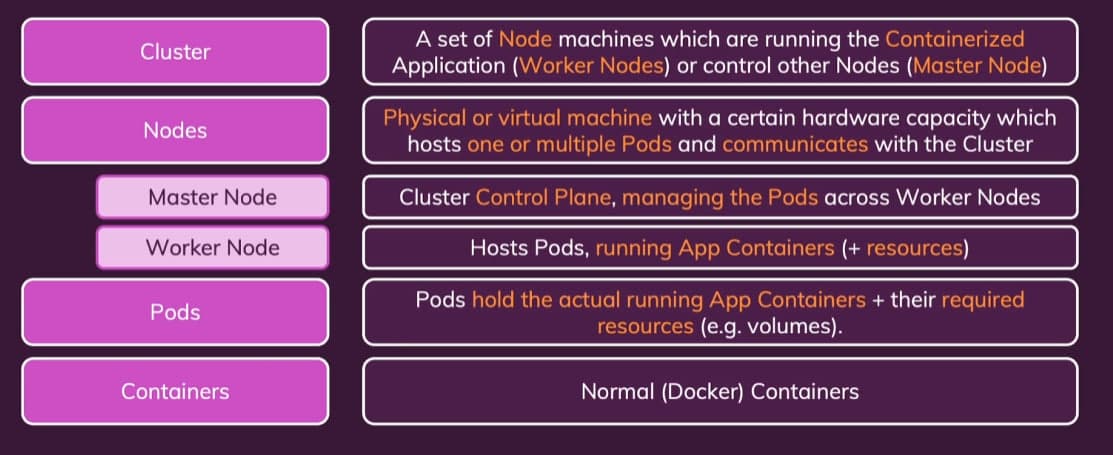
Once the Compose model clicks, Kubernetes is the next layer of abstraction. Where Compose orchestrates containers on a single host, Kubernetes orchestrates containers across many hosts while abstracting the hosts themselves away.
The hierarchy the diagram above captures is the mental model to anchor everything else:
- a cluster is the entire managed environment
- a cluster contains one or more nodes (physical or virtual machines)
- each node runs one or more pods
- each pod runs one or more containers that share network and storage
A pod — not a container — is the smallest scheduling unit in Kubernetes. Containers inside a pod are co-located, share an IP, and live and die together. That single design choice is what enables sidecars, log shippers, and tight inter-process patterns to work without extra plumbing.
Why This Repository Treats Kubernetes as a Separate Layer
Everything in the Compose section assumes one machine. Kubernetes assumes you have given up on caring which machine runs what. The scheduler decides; you describe desired state in manifests, and the cluster's job is to keep reality aligned with that description.
That shift — from "run these containers here" to "keep this desired state alive somewhere in the cluster" — is the real conceptual leap from Docker / Compose to Kubernetes.
🧠 Kubernetes Control Plane
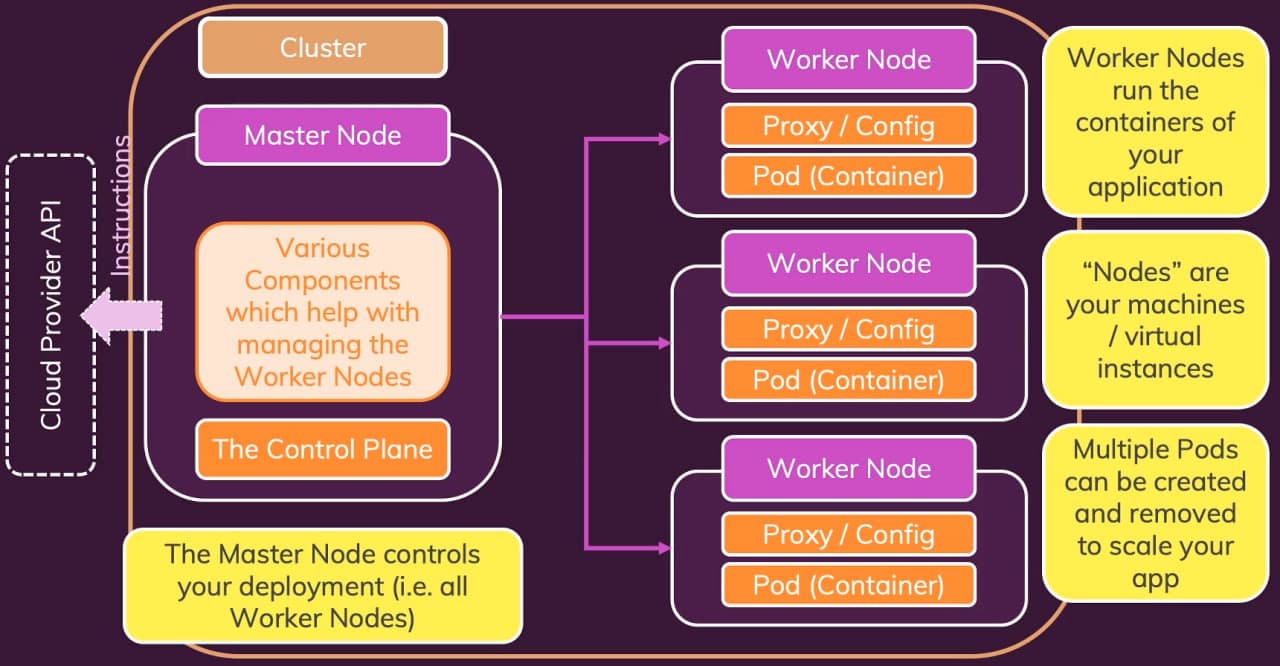
A Kubernetes cluster is split into two roles: the control plane (historically called the master node) and the worker nodes that actually run application pods.
The control plane is the brain of the cluster. It does not run your applications. It runs the components that keep the cluster's desired state aligned with reality:
- API server — the single front door for every interaction with the cluster (
kubectl, controllers, dashboards). Every read and every write goes through it. - etcd — the strongly-consistent key-value store that holds the entire cluster state. If the API server is the front door,
etcdis the filing cabinet behind it. - Scheduler — decides which node should run a newly created pod, based on resource requests, affinities, and constraints.
- Controller manager — runs the control loops that watch the current state and nudge it toward the desired state (replica counts, node lifecycle, endpoint updates, and so on).
The contract is simple to state and powerful in practice: you submit a desired state to the API server; the control plane decides how to make the cluster match it.
Worker Nodes from the Control Plane's Point of View
From the control plane's perspective, worker nodes are interchangeable execution targets. The scheduler does not care which worker runs which pod, as long as the worker has the resources and labels the pod requires. That interchangeability is exactly what makes horizontal scaling and self-healing possible.
🛠️ Kubernetes Worker Nodes
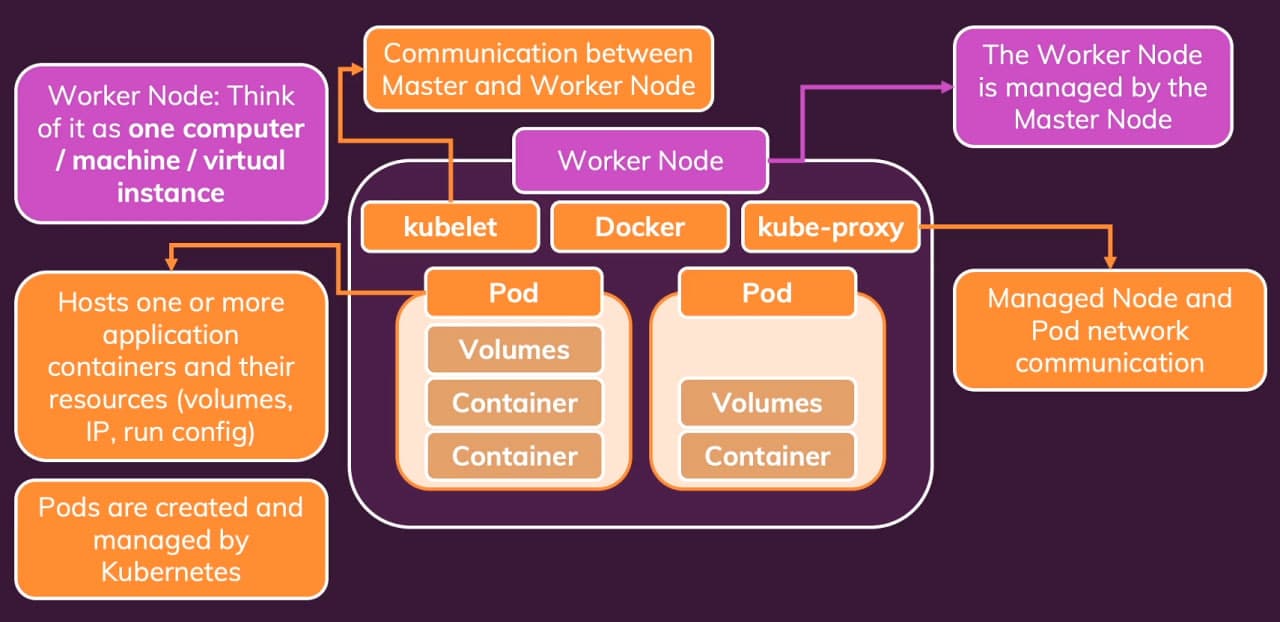
A worker node is where application containers actually run. Every worker has the same small set of moving parts:
- kubelet — the agent that talks to the control plane, accepts pod specs, and tells the container runtime to start or stop containers so the node's actual state matches the desired state.
- kube-proxy — the network component that programs the node's networking rules so that traffic to a Kubernetes Service reaches one of the backing pods, wherever in the cluster they happen to live.
- container runtime — the layer that actually pulls images and runs containers. This is the same layer Docker exposes directly; Kubernetes just drives it through a standard interface.
- pods — the scheduled workload, each containing one or more containers that share network and storage.
Why This Topology Matters in Practice
The worker-node anatomy is the part that ties Kubernetes back to everything in the earlier branches of this repository:
- the container runtime is still pulling images from a registry — exactly the lifecycle shown in the deployment-flow and push/pull diagrams above
- pods are still ultimately containers — the same
EXPOSE 80andCMD ["npm", "start"]you wrote in your Dockerfile - kube-proxy is doing what your
docker network createdid, only across many machines instead of one - kubelet is what
docker compose upwas doing, only continuously and across the whole cluster
Once that mapping clicks, Kubernetes stops feeling like a new universe and starts feeling like Compose generalised to many hosts with a control loop on top.
🎯 Why This Repository Stands Out
Docker & Kubernetes Complete is structured as a progression, not a single demo:
- it isolates each container concept in its own branch
- it walks the image lifecycle explicitly — build, tag, push, pull, run
- it teaches multi-container networking through user-defined bridges and DNS by container name
- it puts volumes, bind mounts, and anonymous volumes side by side in one runnable example
- it introduces Docker Compose as a declarative replacement for manual
docker runsequences - it shows a production-style separation with Nginx, PHP-FPM, MySQL, and isolated tooling containers
- it then maps every Docker primitive onto its Kubernetes equivalent — clusters, control plane, worker nodes, kubelet, kube-proxy
The application code in each branch is intentionally tiny. The point is the container architecture around it: reproducible, declarative, and ready to be lifted from a single host into a Kubernetes cluster without rewriting the mental model.